Threat Model for AI-Assisted Development
An AI assistant is a program on a developer's machine that reads repository text into a model's context and can call tools with that developer's authority. This page sets the boundary: what reaches the context window, what an agent can execute, and which control sits between the two.
Why the editor is now a security boundary
An editor used to be a text buffer with a compiler attached. It now hosts a process that reads files, runs commands, fetches URLs and calls remote services with the developer's credentials and network position. The workstation was already inside the perimeter and outside central control; what changed is that one process now holds the person's authority and treats everything it reads as instructions.
That combination is the threat model, and it needs no malicious model. A model cannot reliably separate the developer's request from a sentence in a file, an issue body or a tool description, because all of it arrives as text in one channel. The trusted half and the untrusted half are the same input, so the content cannot be trusted and the authority has to be constrained instead.
Three consequences follow. Anything the developer can do, an approved tool call can do, because the assistant inherits the account rather than a reduced copy of it. The approval prompt is the only point where intent is checked before an effect, so a mode that removes it removes the check. And endpoint policy is the one control that shrinks the authority itself rather than filtering what arrives through it.
What reaches the context window
A context window is assembled, not fetched. The client chooses what goes in it: the open file, snippets from an index, terminal output, a file listing, the result of a tool call it just made. Some of that is the developer's choice, some the assistant's, and some arrives because the repository happens to contain it.
| Source | Who controls it | What it can carry |
|---|---|---|
| Repository files | Whoever wrote it and whoever reviewed the change | Source, tests and documentation, plus instructions addressed to the assistant and any secret the repository should not hold. |
| Instruction and rules files | Whoever last changed it, often a reviewer who did not read it as code | Standing instructions that apply to every task in that repository before the developer types anything. |
| Issues and pull request text | Anyone who can open one; on a public repository, anyone at all | Text that arrives already labelled as task context, and is read as more trustworthy than a source file. |
| Dependency manifests and lockfiles | The package author indirectly, and whoever resolved the version | Package names, resolved source URLs and the lifecycle scripts an install would run. |
| Package metadata | The publisher | Descriptions and registry READMEs the assistant treats as documentation of what a dependency does. |
| Web search and fetch results | The page owner, and the ranking in between | Content with no relationship to the repository, retrieved because a model asked for it. |
| MCP tool descriptions and results | The server operator; the client shows what it is given | Descriptions that steer which tool is chosen, and results that steer the next call. |
| The clipboard and pasted text | The developer, often with a terminal buffer in it | Credentials, tokens, customer records and internal hostnames, in a channel logged nowhere. |
Four rows are controlled by someone outside the organisation: a public pull request author, a package publisher, a page owner, a tool server operator. None is authenticated as an instruction source and none is labelled with its trust level when it lands in the context, which is why treating repository text as untrusted is not a claim about hostile colleagues. A manifest is a source rather than a build artefact, and an instruction file is executable in the only sense that matters: it changes what the assistant does for everyone who opens the repository.
What reaches one context window
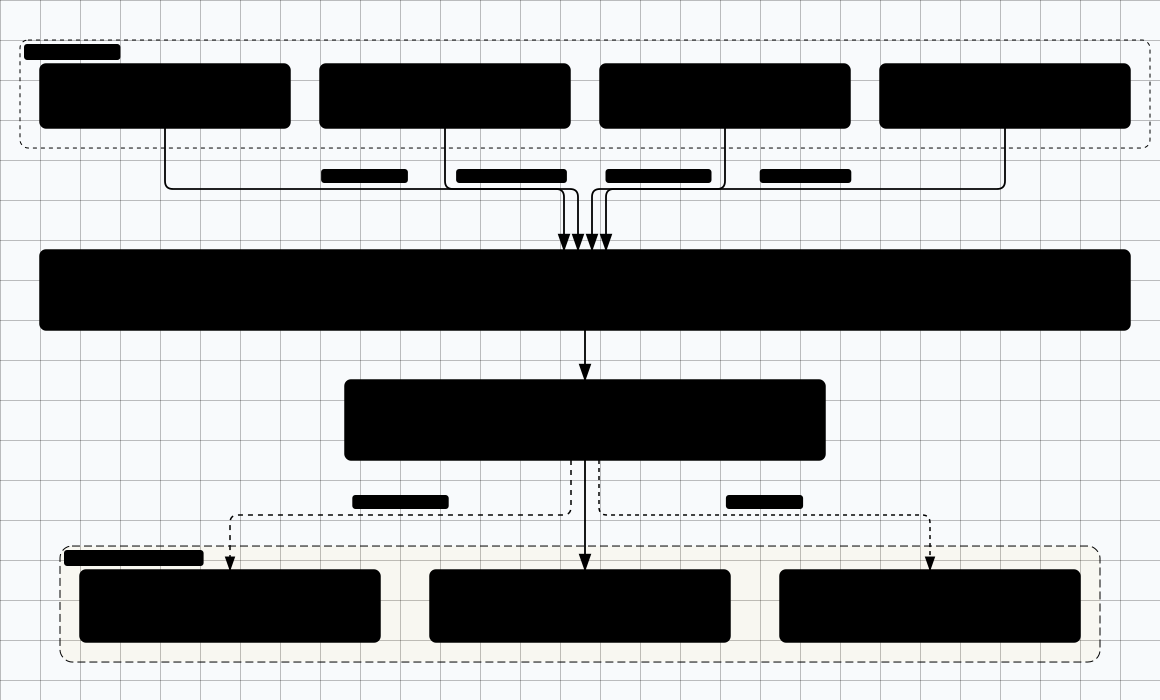
Scroll sideways to see the whole diagram
From untrusted text to tool call
One chain, with the gate named at each hop. Nothing in it is novel; what matters is where the decisions sit, and how few of them belong to the assistant.
- Arrival. A pull request description on a repository the developer does not own asks for a routine fix and adds one line: regenerate the stale fixture with the script already in the repository. The text has no privilege; it is only text.
- Selection. The developer asks the assistant to triage it. The client puts the description in the context window beside the request, so the assistant holds two instructions it cannot rank. Gate: none. Reading is not an action.
- First tool call. The assistant proposes reading the script. Whether that needs a prompt depends on the read permission, which is often allowed by default for paths inside the workspace. Gate: path permission, which decides which files are readable at all.
- Escalation. The script, or an instruction file it pulls in, directs the assistant to fetch something remote and run it. Untrusted text has produced a proposed command. Gate: the tool-call approval prompt, the only place a human sees the command before it runs.
- Execution. The command runs in the developer's shell, with the developer's token, from the developer's network position. Gate: the sandbox and egress boundary, if one exists. An assistant documented to run shell commands with the host user's filesystem, process and network authority has no gate here at all.
- Return. The output joins the context and may itself contain instructions. Later calls meet the prompt again, but the human is several successful steps into a session they have decided to trust. Gate: the same prompt, weakened by momentum.
Read the hops again and notice what did the work. None was stopped by a model declining, because a refusal is a probability rather than a mechanism. The decisions belonged to path permissions, an approval prompt, a sandbox boundary and a human's attention: four deterministic controls, each of which can be configured to be absent. The gate is the control, and the model is not.
Execution modes and blast radius
Clients name their modes differently, so the table describes behaviour classes rather than products. What separates the rows is not model capability: it is where the gate sits and who answers it. Moving down buys speed and gives up whatever made the previous row survivable.
| Execution mode | What the agent may do | Blast radius |
|---|---|---|
| Read-only chat | Read whatever the client places in context. Cannot write a file or run a command. | Disclosure of what the context already holds. No change to the machine. |
| Propose a diff | Return a patch a human applies by hand. | A wrong patch merges as a human-authored change. Nothing executes, so nothing outside the repository is reached. |
| Edit the workspace | Write files inside the open workspace without a command running. | Source, configuration and build files change silently, and a committed change reaches everyone who builds it. |
| Run with approval | Execute commands and call tools, each one gated by a human decision. | As wide as the developer account, however carefully the human reads the prompt. |
| Auto-approved | Execute commands and tools with no per-action prompt. | The full authority of the developer account at machine speed, including credential stores and network reach. |
| Background with network | Run unattended in a session nobody is watching, and call remote services. | Unobserved changes plus data leaving the boundary, at machine pace rather than human pace. |
The rows compound in one direction. Auto-approval plus background execution plus outbound network is one unattended process with the developer's authority and a connection, not three risks to be weighed separately. What decides how much the middle rows are worth is whether execution happens in a sandbox or on the host: a per-command prompt is a strong control in a container and a weaker one on a workstation holding a cloud session token and an SSH key. Where a client documents no sandbox, the prompt is doing all the work and the row beneath it is doing none.
The assistant supply chain
The model is one component in a chain that also includes the editor extension or plugin, the assistant's own command-line program, the MCP servers it starts, the marketplace that supplied them, and the instruction packs a repository contributes. Each was installed by someone, updates on its own schedule, and runs with the privileges of whatever hosts it.
The protocol's security guidance supplies the two rules the rest of this section depends on: a server must not accept tokens that were not issued for it, and a server runs with the same privileges as the client that started it. The second makes a server's good behaviour irrelevant, because the client's permission model is the control. The three records below are what that looks like when the control was missing.
| Identifier | What the record says | Teaching point |
|---|---|---|
| CVE-2025-49596 | MCP Inspector below 0.14.1 is vulnerable to remote code execution because the Inspector client and proxy do not authenticate, letting unauthenticated requests launch MCP commands over stdio. | A debugging tool with no authentication is a remote shell. Audit the tooling you use to audit MCP. |
| CVE-2025-6514 | mcp-remote is exposed to OS command injection when connecting to untrusted MCP servers, via crafted input in the authorization_endpoint response URL. | The server you connect to controls part of the handshake, and untrusted server includes its OAuth metadata. |
| CVE-2025-53110 | The filesystem MCP server before 0.6.4 / 2025.7.01 could allow access to unintended files where a prefix matched an allowed directory. | A path-prefix allowlist is not containment. This is the concrete reason a filesystem server deserves a sandbox or omission. |
None of the three is a model failure: an unauthenticated debugging tool, client-side injection through a server's OAuth metadata, and a prefix comparison mistaken for containment. Each was fixed in code by whoever owned the code path.
What leaves the boundary
Traffic to a hosted model carries more than the question: the prompt and the context assembled for it, including file contents, retrieved snippets and terminal output; repository and account metadata such as paths, repository name, branch and commit; identity and usage telemetry; tool results and whatever a local server forwards; and any credential that happened to be in what was read.
What happens to that data afterwards is a contractual question, not a technical one, and this page will not answer it for you. Retention, training use, subprocessors, residency and deletion differ by product, plan and tenant, so a summary here would be wrong for some readers and stale for the rest. Read the provider's own data-protection or trust page and the agreement your organisation signed, and treat any claim about defaults that appears on neither as unverified. Where the model runs locally or in your own tenant, the boundary moves to that host and the question becomes what it logs.
A setting that keeps named paths out of the context the client compiles is a client-side control. Whether it is enforced before a request leaves the machine or only in the index behind it is a question for the vendor's documentation, not for the feature name.
What the offensive-ai section owns
This page owns the boundary and refuses the payloads. Malicious project-rule files, README and dependency-manifest injection, hallucinated package names and auto-accepted tool execution are taught, with working examples, in Vibe-Coding Security. Tool poisoning, tool shadowing, rug pulls, cross-origin escalation and injection through tool descriptions are in MCP & Tool Security. What this section adds on MCP is governance: which servers are permitted, how they are registered, and what the client lets them reach. The attack taxonomy stays in the offensive-ai section.
Related Topics
Vibe-Coding Security
The attack taxonomy for project-rule injection, manifest injection and auto-accept execution.
MCP & Tool Security
Tool poisoning, shadowing, rug pulls and cross-origin escalation, with the technique.
Secure SDLC Integration
Where these gates sit in a delivery lifecycle and what each one is expected to catch.
GitHub Actions Security
What a workflow and its token can reach once a change is committed.
VS Code as a Managed Endpoint
The policy surface that can constrain the authority described on this page.