Shipping Policy with GPO and Intune
A policy is only as reliable as the path it travels. Group Policy, Intune, a macOS configuration profile and a JSON file on disk all end in the same editor behaviour, but each one fails in its own way, and most of those failures are quiet.
| Platform | Mechanism | Where the value lives | Read it back |
|---|---|---|---|
| Windows, domain-joined | ADMX and ADML templates installed to the central store | Software\Policies\Microsoft\VSCode |
RSoP report, then Policy Diagnostics |
| Windows, Intune-managed | Settings Catalog entry, or a custom profile | The policy node you choose in the portal | Portal status, then Policy Diagnostics |
| macOS | Configuration profile carrying key/value pairs | Inside the profile payload; no preference domain is documented | Profile inventory, then Policy Diagnostics |
| Linux | JSON policy file | /etc/vscode/policy.json |
Read the file, then Policy Diagnostics |
Three delivery paths, one resolved value
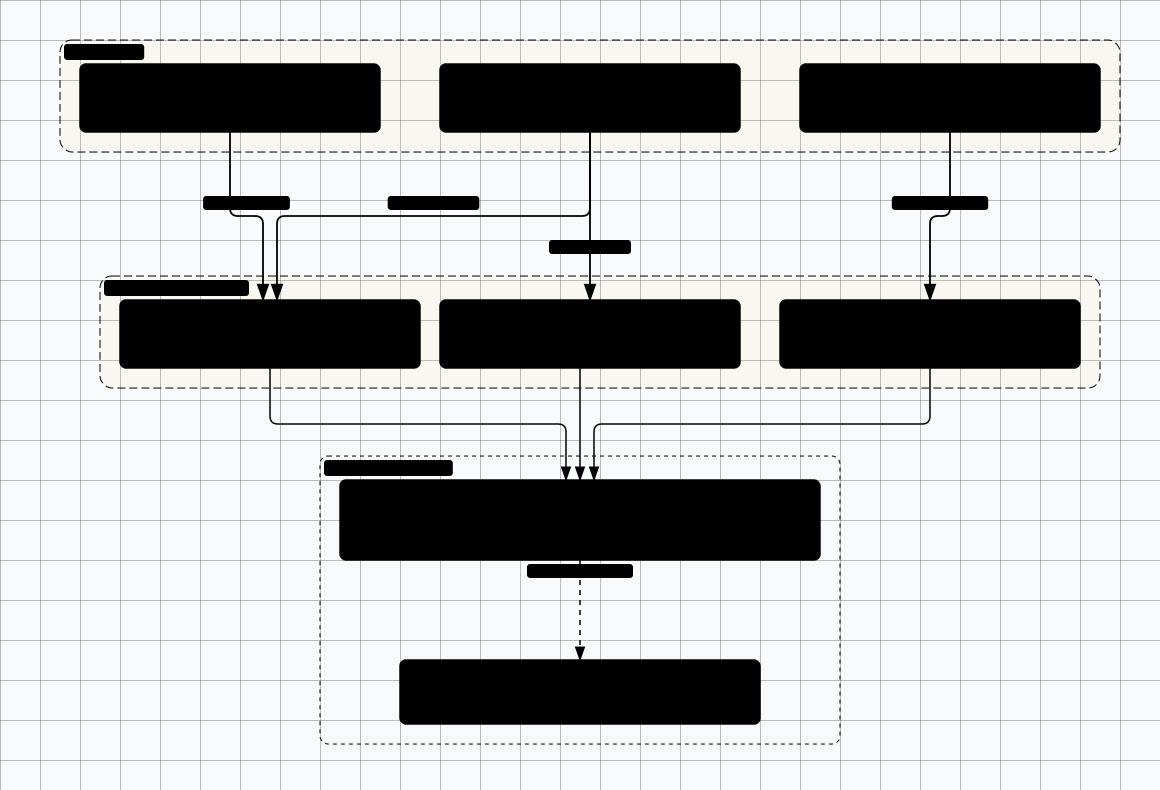

Scroll sideways to see the whole diagram
Windows: Group Policy and the ADMX template
The ADMX and ADML templates ship with the product in a policies folder. The ADMX belongs in the
central store at C:\Windows\PolicyDefinitions, with the ADML in the matching locale
subfolder. A template that exists only in one administrator's local store produces a tree every other
administrator cannot see, which is the first way two people become certain the setting does not exist.
Where the policy object is created decides who wins. A value under Computer Configuration writes the machine hive; a value under User Configuration follows the account. A policy value overrides default, user and workspace settings, and a computer-level policy beats a user-level one, so the half you choose is the precedence order rather than a preference. On a shared or lab machine, only the computer half survives a second person signing in.
The navigation string differs between two places in Microsoft's own page. The Active Directory instructions
say Administrative Templates > Visual Studio Code; the Local Group Policy Editor instructions
give Administrative Templates > Microsoft VS Code. Both are printed because the page prints
both. The label in your tree comes from the template you installed.
Under that node the values land in Software\Policies\Microsoft\VSCode. The export sets two
string values whose accepted spellings are documented: UpdateMode takes default, start, manual or none;
TelemetryLevel takes all, error, crash or off.
Windows Registry Editor Version 5.00

[HKEY_LOCAL_MACHINE\Software\Policies\Microsoft\VSCode]
"UpdateMode"="manual"
"TelemetryLevel"="off"
A value the template does not recognise is silently not applied. No error dialog, no failed write, no event a monitoring system would count: only a line in the Window log. A typo in a value string looks exactly like a working deployment, and every report will say the policy was written.
Fail-open by default
$key = 'HKLM:\Software\Policies\Microsoft\VSCode'

# Presence: is the value on the machine at all?
Get-ItemProperty -Path $key | Select-Object UpdateMode, TelemetryLevel

# Provenance: did it arrive from a policy object rather than a local edit?
gpresult /scope:computer /h "$env:TEMP\vscode-rsop.html"
The read-back is one claim, and the smaller one. Proving the editor accepted the value needs the panel described under detecting drift.
Windows: Intune
Intune offers two routes to the same registry value, and the choice is about who owns the schema. Settings Catalog exposes settings contributed to the catalogue, with a typed value and a validation layer. A custom profile lets you supply the node and the value yourself, whether or not the catalogue knows the setting.
The trade-off is worth stating rather than assuming. Settings Catalog buys validation and a searchable UI, and costs coverage: a setting that has not been contributed to the catalogue for that platform cannot be found by searching harder. A custom profile buys coverage and costs every check, because nothing validates the node or the value, so a mistyped entry is accepted when you author it, reports as delivered when the device collects it, and changes nothing in the editor. The registry trap is here again, with an extra layer of silence in between.
This page deliberately does not print a policy node: the exact one is chosen in the portal when you add the row, and the value you enter is the spelling the ADMX declares.
The profile, in the order the work happens:
- Create a configuration profile for the Windows platform, with a catalog or custom template.
- Add the VS Code setting from the catalogue if it appears there, otherwise as a custom entry carrying the node from the installed template.
- Enter the value exactly as the ADMX declares it, including case in the value string.
- Assign the profile to the pilot ring group, not to all devices.
- Once a device collects it, read the value back and open Policy Diagnostics. A green assignment is not evidence.
- Only then widen the assignment, and only as far as the ring plan allows.
macOS: managed preferences
macOS takes a configuration profile: a .mobileconfig whose payload carries key/value
pairs, delivered by MDM or installed by hand for a pilot. The mechanism is confirmed in the vendor's
documentation. The preference domain is not. The documentation states that a profile carries the pairs
and does not state which domain the application reads them from.
Treat that as a limitation of the source, not a detail to fill in with something plausible. Building a profile needs a domain, and reading one back needs the same domain. A wrong-but-plausible domain yields a profile that installs cleanly, appears in the device's profile inventory, and changes nothing in the editor. No step in that chain reports a problem.
Take the domain from the profile the vendor ships, or from the domain the application registers on a managed machine's first run, and record which. The fragment below is the payload's settings dictionary with the domain deliberately absent. Fill it in from one of those two sources before deploying.
<dict>
  <!-- The preference domain is not stated in the vendor's documentation.
       Take it from the profile the vendor ships, or from the domain the
       application registers on first launch, and record the source. -->
  <key>UpdateMode</key>
  <string>manual</string>
  <key>TelemetryLevel</key>
  <string>off</string>
</dict>
Two read-backs answer different questions. The profile inventory proves the profile is installed, which is a claim about the management channel. Policy Diagnostics inside the editor proves the value was applied, which is the claim that matters.
sudo profiles show -type configuration
defaults read <preference-domain> UpdateMode
Linux: configuration management
No registry and no profile: on Linux the policy is a JSON file at
/etc/vscode/policy.json. That makes it the easiest platform to satisfy and the easiest to
drift, because a file is something anyone with root can edit and nothing on the machine records the
edit.
{
  "UpdateMode": "manual",
  "TelemetryLevel": "off"
}
Idempotence is the whole control here. The task below re-asserts the file on every converge and changes nothing when the content already matches, so the second run is silent, the third is silent, and the run after a local edit puts the file back.
- name: Write VS Code policy file
  become: true
  ansible.builtin.copy:
    dest: /etc/vscode/policy.json
    owner: root
    group: root
    mode: "0644"
    content: |
      {
        "UpdateMode": "manual",
        "TelemetryLevel": "off"
      }
The read-back is the file itself, plus a parse check: a value that does not parse is silently not applied, which on this platform means a typo in a JSON key ships as a policy that does nothing.
cat /etc/vscode/policy.json
python3 -m json.tool /etc/vscode/policy.json > /dev/null && echo "parses"
Image bake and configuration management solve different halves of the problem. A baked image gives every instance a compliant file with no dependency on a management channel, and freezes the value at build time, so a rebuild from an older base re-applies an older policy, in a diff nobody reviews. Configuration management converges on a schedule, but only for machines that check in; a laptop off the network for a week carries whatever was written last.
Running both is normal: the image provides a floor, the role provides the current value. The hazard is ownership. Two writers on one file produce a machine that flips on every rebuild, and the flip looks like drift when it is a disagreement. Give the file one owner.
Rollout rings
A ring is a blast-radius control for the policy itself, not a seniority tier for users: it makes the cost of being wrong small enough to afford being wrong early.
The pilot ring holds the people who wrote the policy plus a couple of machines that can be rebuilt from scratch. What it proves is that the value applies and the editor accepts it: the silent-drop case is found here or by a user who cannot explain what changed. The broad ring is one team with a representative workload, where the question is whether the value blocks a task people actually do. Disabling an update path or an extension publisher is a workflow change, and those complaints never arrive in a report. Then everyone.
Break-glass is not a fourth tier of users. It is a second assignment carrying a relaxed value for a named group, so an engineer blocked out of hours has a route that is recorded rather than a local edit nobody sees. Two conditions make it a control instead of a hole: the group is small and named, and every membership carries an end date.
Mechanically, rings are directory security groups, Intune assignment groups or MDM device groups. Overlap resolves by precedence rather than by order of assignment, because a computer-level policy beats a user-level one, so adding a machine to the new ring while leaving it in the old one does not mean the new value wins. Each ring needs a full week of dwell time and a read-back at the end, because an assignment report is the weakest of the three claims about a policy.
Detecting drift
Three claims can be made about a policy, and they get stronger in a fixed order. The management channel delivered it: the portal's per-device status or an RSoP report says the object reached the machine. The device carries it: a read-back finds the value. The editor applied it: Policy Diagnostics says so.
The command is Developer: Policy Diagnostics. It prints a table of the policies that
applied and a table of the ones that did not, plus the account-policy-gate state: inactive, satisfied or
restricted. It is the only view that comes from the editor rather than the delivery path, and it is why
every verification step here ends there.
The failure this section is built around sits between the second claim and the third. A malformed value passes the first two: the object is delivered, the value is present under the registry branch or in the file, and the editor ignores it because it could not parse it. Nothing in a fleet report distinguishes that machine from a compliant one.
So collect the panel's output rather than assuming it. The export or screenshot of the two tables is the audit evidence, and the useful alert is on absence rather than on a wrong value: an entry that shows as not applied is almost always a value that failed to parse.
The second drift class is a value that is present and superseded. A newer profile replaces an older one, a rebuilt image reinstalls an old file, or someone edits the JSON on a Linux host to unblock a build and never puts it back. None of these raise an error and none look like an incident. All are visible in a read-back, but only if somebody runs one.
The exception request
An exception is a policy object, so the request has to describe one. At minimum it states the policy key and the exact value to be relaxed, the scope as a named group rather than a person, the task the default blocks, the compensating control that applies while the exception is live, an owner, an expiry date, and what would have to change for it to be withdrawn.
Name the group first. Because the exception is delivered as a second assignment carrying a relaxed value, the group is the only thing that makes it findable later: a manual edit on one laptop appears in no report and outlives the person who made it, while a group membership query answers the question in one line. A request that cannot name a group is a local change asking to be forgotten.
The expiry is not paperwork either: a break-glass group with no end date becomes a permanent exemption with a good reason attached, remembered only by the person who has left.
Related Topics
VS Code as a Managed Endpoint
The policy surface and the precedence rules this page delivers
Operating the Control Set
Ownership, evidence and review for the controls shipped here
Secure SDLC Integration
Where the endpoint control set meets the pipeline
Compliance and Legal
How exceptions are documented for a review