Zero Trust Architecture
Zero Trust is a security model based on the principle "never trust, always verify." It assumes that threats exist both outside and inside the network, and every access request must be authenticated, authorized, and encrypted.
The End of Perimeter Security
Core Principles
The three principles below are Microsoft's Zero Trust guiding principles, first articulated in Microsoft's Zero Trust guidance and now widely adopted across the industry.
1. Verify Explicitly
Always authenticate and authorize based on all available data points: identity, location, device health, service, data classification, anomalies.
2. Use Least Privilege Access
Limit user access with just-in-time (JIT) and just-enough-access (JEA). Risk-based adaptive policies that respond to context.
3. Assume Breach
Minimize blast radius with segmentation. Verify end-to-end encryption. Use analytics to detect threats and improve defenses.
NIST SP 800-207 §2.1 Tenets
NIST SP 800-207 §2.1 defines seven basic tenets that a Zero Trust Architecture must satisfy:
- All data sources and computing services are considered resources.
- All communication is secured regardless of network location.
- Access to individual enterprise resources is granted on a per-session basis.
- Access to resources is determined by dynamic policy — including the observable state of client identity, application/service, and the requesting asset — and may include other behavioral and environmental attributes.
- The enterprise monitors and measures the integrity and security posture of all owned and associated assets.
- All resource authentication and authorization are dynamic and strictly enforced before access is allowed.
- The enterprise collects as much information as possible about the current state of assets, network infrastructure, and communications and uses it to improve its security posture.
Zero Trust Pillars
Identities
- • Strong authentication (MFA)
- • Passwordless when possible
- • Conditional access policies
- • Identity governance
Devices
- • Device inventory
- • Compliance checking
- • Endpoint detection
- • Mobile device management
Applications
- • Shadow IT discovery
- • In-app permissions
- • Runtime monitoring
- • API security
Data
- • Data classification
- • Encryption everywhere
- • DLP policies
- • Access tracking
Infrastructure
- • JIT VM access
- • Micro-segmentation
- • Threat detection
- • Config management
Networks
- • Network segmentation
- • Encrypt all traffic
- • Real-time threat protection
- • No implicit trust zones
Zero Trust Network Access (ZTNA)
ZTNA replaces VPNs with identity-aware, context-aware access to specific applications rather than entire network segments.
Traditional VPN
- • Full network access after auth
- • Implicit trust of VPN users
- • Lateral movement possible
- • Performance bottlenecks
- • Binary access model
ZTNA
- • App-specific access only
- • Continuous verification
- • No lateral movement
- • Cloud-native scaling
- • Granular policies
Policy Engine Architecture
Zero Trust Policy Engine Architecture
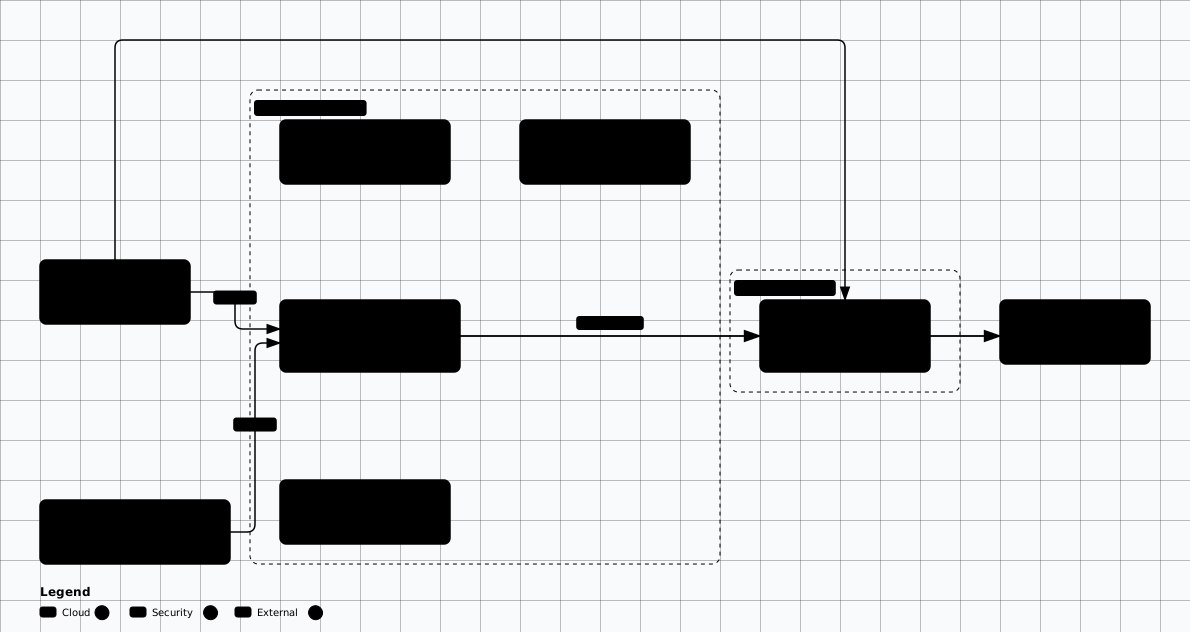
Scroll sideways to see the whole diagram
Implementation Steps
Identify Protected Surfaces
Map critical data, applications, assets, and services (DAAS).
Map Transaction Flows
Understand how users and apps access protected surfaces.
Architect Zero Trust Network
Deploy micro-perimeters around each protected surface.
Create Zero Trust Policies
Define who/what/when/where/why/how for access (Kipling Method).
Monitor and Maintain
Continuous logging, analytics, and policy refinement.
NIST SP 800-207
Practical: OPA Policy for Zero Trust Access
package zerotrust.access

import rego.v1

default allow := false

# Require ALL conditions for access (never trust, always verify)
allow if {
    identity_verified
    device_compliant
    context_acceptable
    permission_granted
}

# Identity must be authenticated with MFA
identity_verified if {
    input.identity.authenticated == true
    input.identity.mfa_verified == true
    time.now_ns() < input.identity.token_expiry_ns
}

# Device must meet compliance baseline
device_compliant if {
    input.device.managed == true
    input.device.os_patched == true
    input.device.encryption_enabled == true
    input.device.edr_running == true
    input.device.risk_score < 50
}

# Context checks: location, time, behavior
context_acceptable if {
    not input.context.impossible_travel
    input.context.risk_score < 70
}

# RBAC + resource-level check
permission_granted if {
    required_role := data.resource_roles[input.resource.path][input.method]
    required_role == input.identity.roles[_]
}Platform-Specific Zero Trust Policies
The OPA policy above shows the logic model. Here's how Zero Trust translates to real platform configurations across the three NIST 800-207 deployment approaches: identity governance (Azure/Entra), network micro-segmentation (Kubernetes), and software-defined perimeter (Cloudflare).
Azure Conditional Access (Identity-Centric)
Replace the placeholder GUIDs with your tenant's application and group object IDs. The
signInRiskLevels condition requires Entra ID P2 — on P1 the risk condition is ignored.
{
  "displayName": "Require MFA + Compliant Device for Sensitive Apps",
  "state": "enabled",
  "conditions": {
    "applications": {
      "includeApplications": [
        "11111111-1111-1111-1111-111111111111",
        "22222222-2222-2222-2222-222222222222"
      ]
    },
    "users": {
      "includeGroups": ["33333333-3333-3333-3333-333333333333"]
    },
    "signInRiskLevels": ["medium", "high"],
    "platforms": {
      "includePlatforms": ["all"]
    }
  },
  "grantControls": {
    "operator": "AND",
    "builtInControls": ["mfa", "compliantDevice"]
  },
  "sessionControls": {
    "signInFrequency": { "value": 4, "type": "hours" },
    "persistentBrowser": { "isEnabled": true, "mode": "never" }
  }
}
What This Policy Does
Kubernetes NetworkPolicy (Micro-Segmentation)
# Zero Trust micro-segmentation: default deny ALL traffic
apiVersion: networking.k8s.io/v1
kind: NetworkPolicy
metadata:
  name: default-deny-all
  namespace: production
spec:
  podSelector: {}
  policyTypes:
  - Ingress
  - Egress

---
# A connection must be allowed at BOTH ends. This is the caller's egress —
# without it api-gateway's default-deny egress drops the request.
apiVersion: networking.k8s.io/v1
kind: NetworkPolicy
metadata:
  name: allow-api-egress-backend
  namespace: production
spec:
  podSelector:
    matchLabels:
      app: api-gateway
  policyTypes:
  - Egress
  egress:
  - to:
    - podSelector:
        matchLabels:
          app: backend-service
    ports:
    - port: 8080
      protocol: TCP

---
# The receiver's ingress: allow api-gateway -> backend on port 8080 only
apiVersion: networking.k8s.io/v1
kind: NetworkPolicy
metadata:
  name: allow-api-to-backend
  namespace: production
spec:
  podSelector:
    matchLabels:
      app: backend-service
  policyTypes:
  - Ingress
  ingress:
  - from:
    - podSelector:
        matchLabels:
          app: api-gateway
    ports:
    - port: 8080
      protocol: TCP

---
# The caller's egress: backend -> postgres on port 5432
apiVersion: networking.k8s.io/v1
kind: NetworkPolicy
metadata:
  name: allow-backend-egress-postgres
  namespace: production
spec:
  podSelector:
    matchLabels:
      app: backend-service
  policyTypes:
  - Egress
  egress:
  - to:
    - podSelector:
        matchLabels:
          app: postgres
    ports:
    - port: 5432
      protocol: TCP

---
# The receiver's ingress: allow backend -> postgres on port 5432 only
apiVersion: networking.k8s.io/v1
kind: NetworkPolicy
metadata:
  name: allow-backend-to-postgres
  namespace: production
spec:
  podSelector:
    matchLabels:
      app: postgres
  policyTypes:
  - Ingress
  ingress:
  - from:
    - podSelector:
        matchLabels:
          app: backend-service
    ports:
    - port: 5432
      protocol: TCP

---
# DNS egress to CoreDNS in kube-system — default-deny blocks :53, and scoping
# to kube-system avoids allowing DNS to any host on port 53.
apiVersion: networking.k8s.io/v1
kind: NetworkPolicy
metadata:
  name: allow-dns-egress
  namespace: production
spec:
  podSelector: {}
  policyTypes:
  - Egress
  egress:
  - to:
    - namespaceSelector:
        matchLabels:
          kubernetes.io/metadata.name: kube-system
    ports:
    - port: 53
      protocol: UDP
    - port: 53
protocol: TCPDefault Deny Is Non-Negotiable
kubectl get networkpolicy -A to audit coverage.
Cloudflare Access (Software-Defined Perimeter)
# Cloudflare Access — ZTNA for internal apps (no VPN needed)
# Provider v5 names; account-scoped resources and object-based conditions.
terraform {
  required_providers {
    cloudflare = {
      source  = "cloudflare/cloudflare"
      version = "~> 5.19"
    }
  }
}

provider "cloudflare" {
  api_token = var.cloudflare_api_token
}

variable "cloudflare_account_id" { type = string }
variable "cloudflare_api_token" {
  type      = string
  sensitive = true
}

resource "cloudflare_zero_trust_access_policy" "allow_employees" {
  account_id       = var.cloudflare_account_id
  name             = "Allow employees"
  decision         = "allow"
  session_duration = "24h"
  include = [
    { email_domain = { domain = "example.com" } }
  ]
}

resource "cloudflare_zero_trust_access_policy" "allow_service_token" {
  account_id = var.cloudflare_account_id
  name       = "Allow CI service token"
  decision   = "non_identity"
  include = [
    { service_token = { token_id = cloudflare_zero_trust_access_service_token.ci.id } }
  ]
}

resource "cloudflare_zero_trust_access_service_token" "ci" {
  account_id = var.cloudflare_account_id
  name       = "CI/CD token"
  duration   = "8760h"
}

resource "cloudflare_zero_trust_access_application" "internal_wiki" {
  account_id       = var.cloudflare_account_id
  name             = "Internal Wiki"
  domain           = "wiki.internal.example.com"
  type             = "self_hosted"
  session_duration = "24h"
  policies = [
    {
      id         = cloudflare_zero_trust_access_policy.allow_employees.id
      precedence = 1
    },
    {
      id         = cloudflare_zero_trust_access_policy.allow_service_token.id
      precedence = 2
    },
  ]
}CISA Zero Trust Maturity Model
CISA Zero Trust Maturity Model v2.0 evaluates the five pillars across four stages — Traditional, Initial, Advanced, and Optimal — plus three cross-cutting capabilities that span every pillar.
| Pillar / Capability | Traditional | Initial | Advanced | Optimal |
|---|---|---|---|---|
| Identity | Passwords, basic MFA | Beginning to automate identity lifecycle | Phishing-resistant MFA | Continuous validation, passwordless |
| Devices | Inventory exists | Some automated onboarding, immature EDR | Compliance enforced | Real-time risk scoring, auto-remediation |
| Networks | Macro-segmentation | Beginning identity-aware segmentation | Micro-segmentation | Encrypted everywhere, no implicit trust |
| Applications and Workloads | Some cloud integration | Beginning SSO and cloud workload integration | SSO + context-aware access | Per-request authz, runtime monitoring |
| Data | Basic classification | Manual inventory, emerging classification | Auto-classification, DLP | Granular controls per datum, full lineage |
| Cross-Cutting Capabilities | ||||
| Visibility & Analytics | Event logging, manual review | Centralised logging, ad hoc analysis | Centralised analytics, automated alerting | Continuous, cross-pillar visibility and analytics |
| Automation & Orchestration | Manual configuration and response | Scripted workflows, partial automation | Automated policy enforcement and response | Fully orchestrated, self-healing workflows |
| Governance | Ad hoc, siloed governance | Emerging formal governance and roles | Enterprise-wide governance aligned to ZT strategy | Continuous, risk-driven governance across all pillars |
Migration Strategy: VPN to Zero Trust
Phase 1: Foundation (Months 1-3)
- • Inventory all users, devices, and applications
- • Deploy centralized identity provider with MFA
- • Map application access patterns and dependencies
- • Start with low-risk applications (e.g., SaaS apps)
Phase 2: Expand (Months 4-8)
- • Deploy ZTNA proxy for internal web apps
- • Implement device compliance checking
- • Add conditional access policies (location, risk)
- • Run VPN and ZTNA in parallel — migrate app by app
Phase 3: Optimize (Months 9-12)
- • Decommission VPN for migrated apps
- • Enable micro-segmentation in production
- • Deploy continuous verification and adaptive policies
- • Measure: mean time to detect (MTTD), mean time to contain (MTTC)
Zero Trust Anti-Patterns
Common Mistakes That Derail ZT Initiatives
"Just Buy a Product"
Zero Trust is an architecture strategy, not a product SKU. No single vendor delivers it. You need identity + device + network + app + data controls working together across platforms.
Big Bang Migration
Migrating everything at once guarantees outages and organizational pushback. Start with SaaS apps (lowest risk, fastest ROI), then internal web, then legacy. Run VPN in parallel during transition.
Ignoring User Experience
If ZT access is slower or harder than VPN, users will find workarounds. SSO + passwordless auth should make ZT feel easier, not harder. Measure login friction and session interruptions.
Default-Deny Without Baselining First
Enabling strict deny policies before mapping traffic patterns causes legitimate blocks and incident tickets. Deploy in log-only/audit mode first, build a baseline for 2-4 weeks, then enforce.
Treating Legacy Apps as Hopeless
Legacy apps without modern auth can still be wrapped with ZTNA proxies (Cloudflare Access, Zscaler Private Access). You don't need to rewrite — front them with identity-aware gateways.
Zero Trust Tools & Platforms
Identity Providers
Okta, Microsoft Entra ID, Google Workspace, Ping Identity
ZTNA Solutions
Zscaler, Cloudflare Access, Palo Alto Prisma, Akamai EAA
Micro-Segmentation
Illumio, VMware NSX, Guardicore, Cisco Secure Workload
Policy Engines
Open Policy Agent (OPA), Azure Policy, Styra DAS
Framework Alignment
NIST CSF 2.0: PR.AA (Identity Management, Authentication, Access Control), PR.DS (Data Security), PR.PS (Platform Security), DE.CM (Continuous Monitoring)
CISA: Zero Trust Maturity Model v2.0 (5 pillars: Identity, Devices, Networks, Applications and Workloads, Data; 3 cross-cutting capabilities: Visibility & Analytics, Automation & Orchestration, Governance)
CIS Controls v8.1: 6 (Access Control), 12 (Network), 13 (Monitoring)
Related: Security Frameworks → | Reference Architectures →
Zero Trust Architecture Labs
Hands-on exercises to implement and validate Zero Trust controls across identity, network, and access layers.
Evidence to Capture
Zero trust is a claim about enforcement points and decision inputs. Both are countable.
Protected surface entry: The named resource or data store, its classification, and the policy that refers to it. A surface no policy names is protected by hope.
PEP inventory: Every route to the surface with its policy enforcement point: gateway route, service mesh filter, conditional access policy. A single unenforced route, a management port or a legacy tunnel, defeats the model.
Decision inputs: What the policy engine receives at decision time: identity, device posture, network context, resource sensitivity. A policy that references posture while no posture signal is sent degrades silently to identity-only.
Session parameters: Token lifetime, re-authentication interval, and revocation propagation time in seconds. These are the numbers that make continuous verification real.
Migration evidence: Parallel-run access logs for the VPN and ZTNA cohorts: success rate, latency, denied attempts, and the interim routes kept open with their owners.
Likely False Positives
Where the missing control is verification you did not look for.
- Service-to-service call with no token: Mutual TLS with workload identity is verification of the peer. Read the peer-authentication policy before reporting implicit trust.
- Break-glass account that bypasses policy: An emergency path is required. It is a finding only when it is unmonitored, unlimited in time, or has no owner.
- Legacy path still open: A documented migration phase with an owner and a close date is a plan, not a gap. Without either, it is a gap.
- Device posture unenforced: Posture can be evaluated at the identity provider instead of the gateway. Check the conditional access or IdP policy before scoring it missing.
- Flat network in a zero trust design: Micro-segmentation on workload identity rather than subnets is the intended pattern. The workload policy is the control to read.
Review Checklist
Protected surface
- ☐ Enumerate routes to each protected resource, including administrative, backup, and CI paths.
- ☐ Confirm each route has a named enforcement point and that the point is on the path, not beside it.
- ☐ Check data-at-rest stores are in the surface list, not only interactive applications.
- ☐ Verify the surface list is derived from the asset inventory rather than from the applications team remembers.
Policy decision
- ☐ Read the policy and confirm the default for an unmatched request is deny.
- ☐ Confirm the inputs the policy reads are actually supplied at runtime.
- ☐ Check the decision and the reason are logged with subject, device, and resource identifiers.
- ☐ Test a stale-device and a revoked-user scenario against the policy before accepting it.
Migration and operation
- ☐ Confirm the parallel-run evidence covers the failure cases, not only the successful sign-ins.
- ☐ List every remaining non-ZT route with an owner and a closure date.
- ☐ Check revocation propagation was measured, not assumed.
- ☐ Confirm break-glass use is alerted and reviewed on a schedule.
Remediation
Close the path, then complete the decision
Structural
- • Put the enforcement point on every route to the surface, including management and CI paths, and remove the bypass rather than firewalling it more tightly.
- • Make the policy deny by default and require the resource to be named before access is granted, so a new service is closed on creation.
- • Feed device and context signals into the decision, or delete the posture condition from the policy; a condition evaluated against nothing is worse than none.
Compensating
- • Where a legacy path must stay open during migration, restrict it to named users and alert on every use until it closes.
- • For break-glass access, require time-bound approval and review the log weekly.