Threat Modeling
Threat modeling is the process of identifying potential security threats and vulnerabilities in a system during the design phase. This proactive approach helps teams build security into systems from the start rather than bolting it on afterward.
Why Threat Model?
Running Example: Online Banking Portal
Throughout this guide, we'll apply each methodology to the same target system — an online banking portal. This makes the frameworks concrete rather than abstract. As you read through each methodology below, mentally apply it to this architecture.
Data Flow Diagram — Banking Portal Architecture
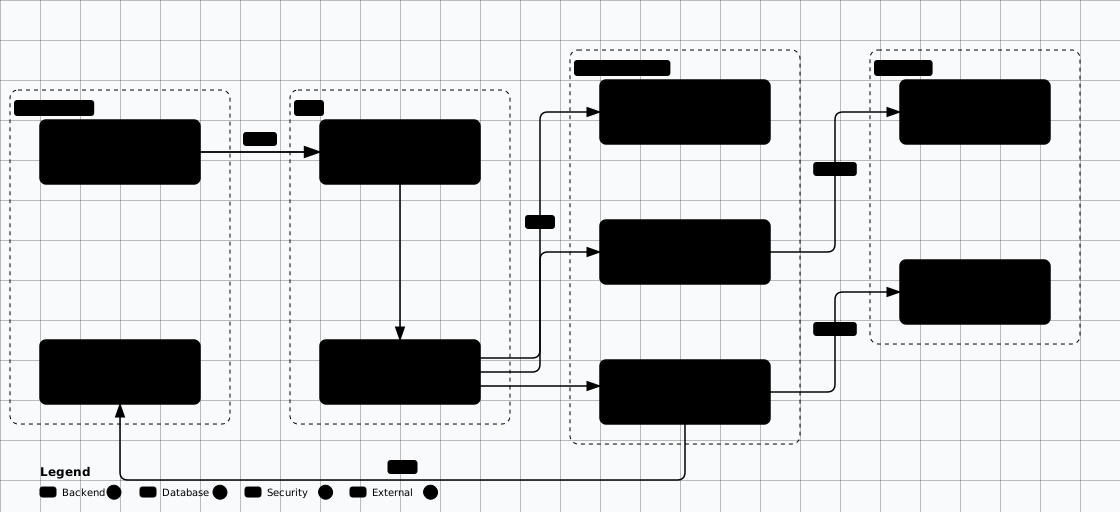
Scroll sideways to see the whole diagram
Untrusted clients & external APIs
Ingress filtering & routing
Business logic & auth
PII & financial records
DFD Elements and Levels
The banking-portal diagram above uses four standard DFD element types and can be read at several levels of increasing detail:
DFD Elements
- □ External Entity - Outside the system boundary
- ○ Process - Transforms data
- ═ Data Store - Persists data
- → Data Flow - Movement of data
- - - Trust Boundary - Security perimeter
DFD Levels
- Level 0: Context diagram - System as single process
- Level 1: Major subsystems and data flows
- Level 2: Detailed view of each subsystem
- Level 3+: Granular component analysis
Threat Modeling Process
With the system and its data flow diagram defined, work through the steps below in order; the methodologies that follow each formalize one of these steps.
Identify Assets
What are we trying to protect? Data, functionality, reputation, compliance status.
Create Architecture Diagrams
Build Data Flow Diagrams (DFDs) showing processes, data stores, data flows, and trust boundaries.
Identify Threats
Apply STRIDE to each element. Consider who might attack, their motivations, and capabilities.
Rate Threats
Use DREAD or CVSS to prioritize threats by risk. Focus on high-impact, high-likelihood threats first.
Determine Mitigations
For each threat: mitigate (reduce risk), eliminate (remove feature), transfer (insurance), or accept.
Validate & Iterate
Verify mitigations are implemented. Update threat model as architecture evolves.
Reference This Diagram
STRIDE Methodology
STRIDE is Microsoft's threat modeling framework that categorizes threats into six categories. Each category maps to a specific security property that the threat violates.
| Threat | Description | Security Property | Example |
|---|---|---|---|
| Spoofing | Pretending to be something or someone else | Authentication | Attacker uses stolen credentials |
| Tampering | Modifying data or code without authorization | Integrity | SQL injection modifies database |
| Repudiation | Denying having performed an action | Non-repudiation | User denies making a transaction |
| Information Disclosure | Exposing information to unauthorized parties | Confidentiality | Sensitive data in error messages |
| Denial of Service | Denying or degrading service to users | Availability | Resource exhaustion attack |
| Elevation of Privilege | Gaining capabilities without authorization | Authorization | Local user gains admin rights |
STRIDE per Element
Apply STRIDE to each element in your Data Flow Diagram (DFD):
External Entities
Vulnerable to: S, R
Users, external systems, third-party APIs
Processes
Vulnerable to: S, T, R, I, D, E
Application logic, services, functions
Data Stores
Vulnerable to: T, R, I, D
Databases, files, caches, message queues
Data Flows
Vulnerable to: T, I, D
Network connections, API calls, IPC
PASTA Framework
Process for Attack Simulation and Threat Analysis (PASTA) is a seven-stage, risk-centric threat modeling methodology that aligns business objectives with technical requirements.
Define Objectives
Identify business objectives, security requirements, and compliance needs. What are we protecting and why?
Define Technical Scope
Document the technical environment: infrastructure, applications, dependencies, and data flows.
Application Decomposition
Create DFDs, identify trust boundaries, entry points, assets, and privilege levels.
Threat Analysis
Research attack patterns, threat intelligence, and relevant threat actors for your industry.
Vulnerability Analysis
Map vulnerabilities to threat scenarios. Use vulnerability databases, SAST/DAST results.
Attack Modeling
Build attack trees, simulate attacks, and determine attack probability and impact.
Risk & Impact Analysis
Quantify risk, prioritize mitigations, and develop countermeasures aligned with business impact.
DREAD Risk Rating
DREAD is a qualitative risk rating model used to prioritize threats. Each category is rated 1-10 and averaged to produce an overall risk score.
| Factor | Question | Low (1-3) | High (8-10) |
|---|---|---|---|
| Damage | How bad is the impact? | Minor data leakage | Complete system compromise |
| Reproducibility | How easy to reproduce? | Requires rare conditions | Always reproducible |
| Exploitability | How easy to exploit? | Requires expert skills | Script kiddie can do it |
| Affected Users | How many users affected? | Single user | All users |
| Discoverability | How easy to find? | Requires source code access | Obvious in UI/docs |
DREAD Score Calculation
Risk = (D + R + E + A + D) / 5
1-3: Low Risk | 4-7: Medium Risk | 8-10: High Risk
DREAD is a legacy method: Microsoft stopped promoting it around 2008, and modern practice prefers CVSS or STRIDE paired with a structured risk assessment.
LINDDUN (Privacy Threats)
LINDDUN is a privacy-focused threat modeling framework, essential for GDPR compliance and privacy-by-design requirements.
Linkability
Ability to link two or more items of interest about a data subject
Identifiability
Ability to identify a data subject within a set of subjects
Non-repudiation
Inability to deny a claim (can be privacy-negative)
Detectability
Ability to distinguish whether an item of interest exists
Disclosure of Information
Exposure of personal data to unauthorized parties
Unawareness
Data subject is unaware of data collection or processing
Non-compliance
Not complying with legislation, regulations, or corporate policies (GDPR, CCPA, HIPAA)
Attack Trees
Attack trees are hierarchical diagrams showing how a system might be attacked. The root node is the attacker's goal, and child nodes represent ways to achieve that goal.
Attack Tree — Steal User Credentials
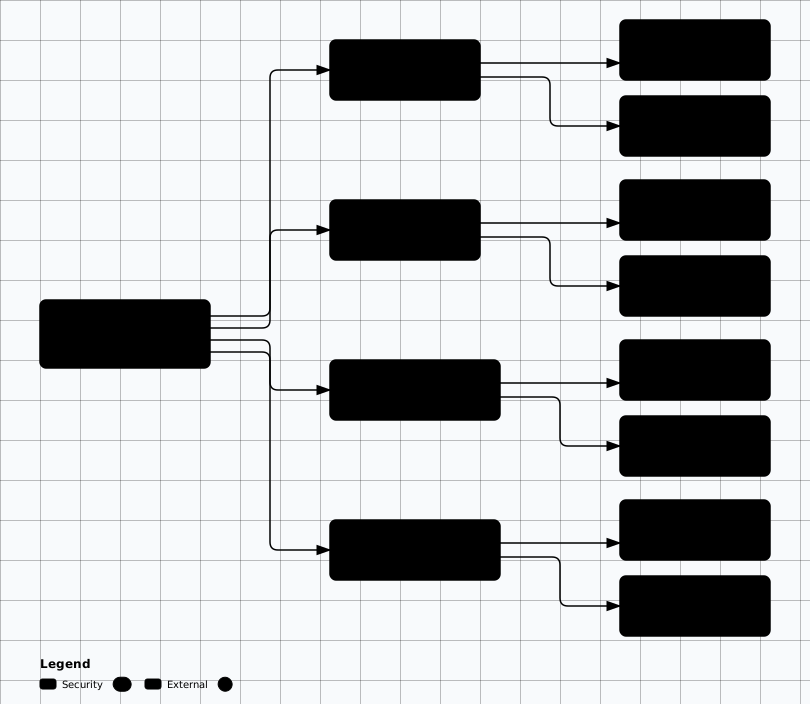
Scroll sideways to see the whole diagram
OR Nodes
Any child node can achieve the parent goal. Attack succeeds if ANY path works.
AND Nodes
All child nodes must succeed for the parent goal. Attack requires ALL conditions.
Use the Attack Tree Builder Tool
Methodology Comparison
Choose the right methodology based on your context. Most organizations combine STRIDE for technical analysis with PASTA for business-risk alignment.
| Methodology | Focus | Best For | Complexity |
|---|---|---|---|
| STRIDE | Technical threats per element | Developer-led, application-level | Low-Medium |
| PASTA | Risk-centric, business-aligned | Enterprise, compliance-driven | High |
| LINDDUN | Privacy threats | GDPR/CCPA, healthcare, fintech | Medium |
| DREAD | Risk rating/prioritization | Scoring supplement to STRIDE | Low |
| Attack Trees | Goal-based decomposition | Red team planning, specific threats | Medium |
Worked Example: STRIDE Analysis of the Banking Portal
Let's apply STRIDE to the API Gateway from our banking portal. As a process element, the API Gateway is vulnerable to all six STRIDE categories. This produces a concrete threat register — the deliverable that makes threat modeling actionable.
| ID | STRIDE | Threat Description | DREAD | Mitigation |
|---|---|---|---|---|
| T-GW-01 | Spoofing | Attacker presents forged JWT to bypass authentication | 7.0 | JWT signature verification (RS256), short TTL, token revocation list |
| T-GW-02 | Tampering | MitM modifies request payload between WAF and gateway | 6.0 | mTLS between all internal services, request body signing |
| T-GW-03 | Repudiation | User denies initiating a fund transfer | 5.6 | Immutable audit logs, request signing with user certificate |
| T-GW-04 | Info Disclosure | Error responses leak internal service paths and DB versions | 7.6 | Generic error responses, sanitize stack traces, custom error handler |
| T-GW-05 | Denial of Svc | Rate limiting bypass causes gateway resource exhaustion | 6.6 | Multi-layer rate limiting (WAF + GW + service), circuit breakers |
| T-GW-06 | Elev. of Priv | IDOR allows accessing other users' account data | 7.0 | Object-level authorization checks, user context bound to every query |
DREAD Score Breakdown — T-GW-04 (Information Disclosure)
(4 + 9 + 8 + 9 + 8) / 5 = 7.6 → High Risk
Despite low damage per incident, the extreme ease of discovery and reproduction elevates this to high priority. Fix before launch.
This Is Your Deliverable
Practical: Threagile Threat Model as Code
Threagile lets you define your architecture and threat model in YAML, then auto-generates risks and a PDF report. Great for CI/CD integration.
title: E-Commerce Application Threat Model
date: 2026-01-15
author:
  name: Security Architecture Team

# Define data assets
data_assets:
  customer-pii:
    description: Customer personal data (name, email, address)
    usage: business
    origin: customer
    owner: product-team
    quantity: many
    confidentiality: confidential
    integrity: critical
    availability: important

  payment-data:
    description: Credit card and payment tokens
    usage: business
    origin: customer
    owner: payments-team
    quantity: many
    confidentiality: strictly-confidential
    integrity: mission-critical
    availability: critical

# Define trust boundaries
trust_boundaries:
  internet-boundary:
    type: network-cloud-security-group
    description: Internet to DMZ boundary
    technical_assets_inside:
      - cdn-waf
      - load-balancer

  application-boundary:
    type: network-cloud-security-group
    description: Application tier
    technical_assets_inside:
      - web-app
      - api-service
      - auth-service

# Define technical assets
technical_assets:
  cdn-waf:
    type: process
    usage: business
    technologies:
      - waf
    internet: true
    machine: container
    encryption: none

  load-balancer:
    type: process
    usage: business
    technologies:
      - load-balancer
    internet: true
    machine: container
    encryption: none

  web-app:
    type: process
    usage: business
    technologies:
      - web-application
    internet: false
    machine: container
    encryption: none
    communication_links:
      api-call:
        target: api-service
        protocol: https
        authentication: token
        data_assets_sent:
          - customer-pii
        data_assets_received:
          - customer-pii

  api-service:
    type: process
    usage: business
    technologies:
      - web-service-rest
    internet: false
    machine: container
    encryption: none
    communication_links:
      db-query:
        target: customer-db
        protocol: jdbc-encrypted
        authentication: credentials
        data_assets_sent:
          - customer-pii
        data_assets_received:
          - customer-pii

  auth-service:
    type: process
    usage: business
    technologies:
      - web-service-rest
    internet: false
    machine: container
    encryption: none

  customer-db:
    type: datastore
    usage: business
    technologies:
      - postgresql
    internet: false
    machine: container
encryption: transparentRun Threagile
docker run --rm -v $(pwd):/app/work threagile/threagile -model /app/work/threagile-model.yaml
Generates: risks report, data flow diagram, technical assets diagram, and PDF report.
Threat Modeling Tools
Microsoft Threat Modeling Tool
Free tool for creating DFDs and auto-generating STRIDE threats
Free • WindowsOWASP Threat Dragon
Open-source threat modeling tool with diagram editor
Free • Cross-platformSTRIDE Modeler Tool
Interactive STRIDE threat modeling tool built into Hacker's Manifest
Built-in • InteractiveThreagile
Agile threat modeling as code — YAML-based with auto-generated risk reports
Free • CLI • CI/CD friendlyIriusRisk
Automated threat modeling with questionnaire-driven analysis and Jira integration
Commercial • Enterprisepytm (Python Threat Modeling)
Define system architecture in Python, auto-generate threats and DFD diagrams
Free • Python • ProgrammaticFramework Alignment
Threat Modeling Labs
Hands-on exercises to build practical threat modeling skills using the frameworks covered above.
Go deeper → The Threat Modeling Deep-Dive in our Threat & Risk Assessment section covers STRIDE per-element, PASTA 7-stage, VAST, LINDDUN+, and hybrid workflows in detail.
Evidence to Capture
What proves a threat-model finding is real rather than a diagram opinion.
Model artefact and revision: The committed model file (Threagile YAML, .drawio, or the modelling tool export) with its git ref or revision date, so the finding can be re-read against the exact model that was reviewed.
The DFD element: Name the element type (process, data store, external entity, data flow) and the trust boundary it crosses, plus the diagram level. A threat with no element reference cannot be verified.
The STRIDE row: Category, element, the stated mitigation, and the named owner. A row with a mitigation but no owner is an aspiration, not a control.
The abuse path: The attack-tree branch or abuse-case narrative that runs from an entry point at a boundary to the asset, with the node where a control cuts it.
Scope and assumptions: The written list of what the model excludes (identity provider, payment processor, the plant network) and the reason for each exclusion.
Likely False Positives
Gaps that are usually controls recorded somewhere other than the diagram.
- Control enforced outside the drawing: TLS termination at the load balancer, or rate limiting at the edge, is often absent from the DFD. The ingress or proxy configuration is the evidence that closes the gap.
- Boundary assumed trusted: Defensible only where the assumptions section names the enforcement point for that network boundary. A boundary with no named enforcement point is a real finding, not a documentation gap.
- Inflated DREAD score: An inconsistent score is a calibration problem, not a missing threat. Check the rubric was applied uniformly before raising a design issue.
- Element drawn on another level: Level-2 detail is frequently excluded from the context diagram by design. Check the model index for the element before recording it as missing.
- Out-of-scope by stated assumption: A third-party SaaS tenant with its own control statement is genuinely out of scope when the assumption records the shared-responsibility split.
Review Checklist
Scope
- ☐ Confirm the diagram level and boundary list against the deployed architecture or current IaC, not a slide deck.
- ☐ Check every external entity has a name, an owner, and a stated trust relationship.
- ☐ Verify each excluded system appears in the assumptions with a reason.
- ☐ Confirm the model is re-dated after the last architectural change.
Controls
- ☐ Walk STRIDE per element and confirm each category is mitigated by a named control or accepted with an owner.
- ☐ For each boundary crossing, name the control that authenticates, authorises, validates, and logs the crossing data.
- ☐ Confirm data stores carry a classification, and that PII stores have a named protection control.
- ☐ Trace each attack-tree leaf to an entry in the control inventory.
Failure modes
- ☐ Find elements with no inbound authentication: internal APIs that trust their caller.
- ☐ Check whether any single control spans two boundaries, and verify it is on the path for both.
- ☐ Confirm decommissioned elements are removed rather than marked dormant.
- ☐ Replay the most recent real incident against the model; a model that cannot see it is stale.
Remediation
Fixes that change the model, not just the document
Structural
- • Place the enforcement control at the boundary the DFD draws, so the mitigation is visible where the data changes trust level. A control added inside the callee still leaves the crossing unprotected.
- • Split an element that holds two trust levels into two elements joined by a data flow, which forces the boundary to be named.
- • Put the model in the repository next to the IaC and gate the build on model validation, so an unmodelled boundary fails a check instead of a review.
Compensating
- • Where a boundary cannot be enforced yet, record the compensating detection control and the date it is reviewed.
- • For accepted threats, record the risk owner and the re-review trigger (volume change, new integration, incident).
Related Topics
Architecture Risk Analysis
Turn the threat model into ranked, owned risks, abuse cases, and a risk register
Security Frameworks
Map controls to NIST CSF 2.0, ISO 27002, CIS Controls v8.1, and OWASP SAMM
Threat Modeling Deep-Dive
STRIDE per-element, PASTA 7-stage, VAST, and LINDDUN+ workflows in detail