Defense in Depth
Defense in Depth is a security strategy that layers multiple security controls throughout an IT system. If one layer fails, other layers continue to provide protection.
The Castle Analogy
Defense in Depth Layers
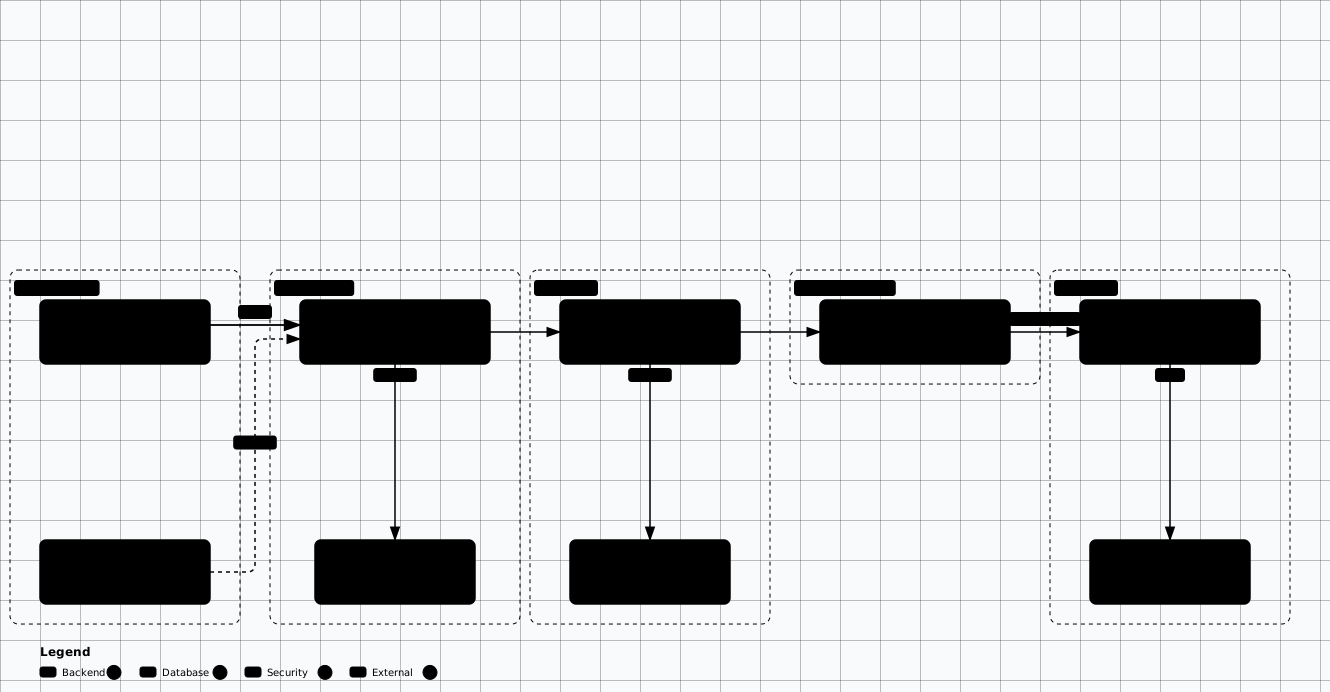
Scroll sideways to see the whole diagram
Security Layers
Physical Security
Data center access controls, surveillance, environmental controls, hardware security.
- • Biometric access to server rooms
- • Security cameras and motion sensors
- • Hardware destruction policies
Network Security
Firewalls, IDS/IPS, network segmentation, DDoS protection, VPNs.
- • Next-gen firewalls with deep packet inspection
- • Network segmentation with VLANs
- • Zero Trust network architecture
Perimeter Security
WAF, API gateways, DDoS mitigation, email security, reverse proxies.
- • Web Application Firewall (WAF) rules
- • Rate limiting and throttling
- • Bot detection and mitigation
Host Security
OS hardening, endpoint protection, host-based firewalls, patch management.
- • Minimal OS installations
- • EDR/XDR solutions
- • Automated patching pipelines
Application Security
Secure coding, input validation, authentication, authorization, SAST/DAST.
- • Security-focused code reviews
- • OWASP Top 10 mitigations
- • Runtime application self-protection (RASP)
Data Security
Encryption, access controls, DLP, backup and recovery, data classification.
- • Encryption at rest and in transit
- • Database activity monitoring
- • Data loss prevention (DLP) rules
Network Segmentation
Network segmentation divides a network into smaller, isolated segments. This limits lateral movement and contains breaches to a single segment.
DMZ Architecture
Isolate public-facing services from internal network.
Internet → [Firewall] → DMZ → [Firewall] → Internal
- • Web servers in DMZ
- • Database servers internal
- • Strict ingress/egress rules
Micro-Segmentation
Granular segmentation at workload level.
App1 ←→ DB1 only
App2 ←→ DB2 only
App1 ✗ DB2 blocked
- • Software-defined networking
- • Container network policies
- • Service mesh enforcement
Practical: Kubernetes Network Policy
A default-deny baseline plus explicit allow rules is the network half of least privilege. The fully annotated, consolidated manifest lives in Reference Architectures. Field semantics are documented in the Kubernetes NetworkPolicy documentation.
# Default-deny all ingress, then whitelist specific flows
apiVersion: networking.k8s.io/v1
kind: NetworkPolicy
metadata:
  name: api-allow-frontend-only
  namespace: production
spec:
  podSelector:
    matchLabels:
      app: api-server
  policyTypes:
    - Ingress
    - Egress
  ingress:
    # Only allow frontend pods in the production namespace on port 8080.
    # podSelector + namespaceSelector in the SAME list item means AND; as two
    # list items they would be OR'd (frontend anywhere, OR anything in prod).
    - from:
        - namespaceSelector:
            matchLabels:
              kubernetes.io/metadata.name: production
          podSelector:
            matchLabels:
              app: frontend
      ports:
        - protocol: TCP
          port: 8080
  egress:
    # Only allow traffic to the database on port 5432
    - to:
        - podSelector:
            matchLabels:
              app: postgres
      ports:
        - protocol: TCP
          port: 5432
    # Allow DNS resolution
    - to:
        - namespaceSelector: {}
          podSelector:
            matchLabels:
              k8s-app: kube-dns
      ports:
        - protocol: UDP
port: 53Practical: Azure NSG Rules with Terraform
Rules are evaluated by ascending priority number. See the Microsoft Azure network security groups overview for default rules and service tags.
# Defense in Depth: layered Network Security Groups
# Layer 3 — Application Gateway (public-facing)
resource "azurerm_network_security_group" "appgw" {
  name                = "appgw-nsg"
  location            = azurerm_resource_group.main.location
  resource_group_name = azurerm_resource_group.main.name
}

resource "azurerm_network_security_rule" "appgw_https_in" {
  name                        = "allow-https-inbound"
  priority                    = 100
  direction                   = "Inbound"
  access                      = "Allow"
  protocol                    = "Tcp"
  source_port_range           = "*"
  destination_port_range      = "443"
  source_address_prefix       = "*"            # HTTPS from internet
  destination_address_prefix  = "*"
  resource_group_name         = azurerm_resource_group.main.name
  network_security_group_name = azurerm_network_security_group.appgw.name
}

# Layer 4 — Application tier (private)
resource "azurerm_network_security_group" "app" {
  name                = "app-nsg"
  location            = azurerm_resource_group.main.location
  resource_group_name = azurerm_resource_group.main.name
}

resource "azurerm_network_security_rule" "app_from_appgw" {
  name                        = "allow-appgw-inbound"
  priority                    = 100
  direction                   = "Inbound"
  access                      = "Allow"
  protocol                    = "Tcp"
  source_port_range           = "*"
  destination_port_range      = "8080"
  source_address_prefix       = "10.0.1.0/24"  # Only from App Gateway subnet
  destination_address_prefix  = "*"
  resource_group_name         = azurerm_resource_group.main.name
  network_security_group_name = azurerm_network_security_group.app.name
}

resource "azurerm_network_security_rule" "app_to_db" {
  name                        = "allow-app-to-db"
  priority                    = 100
  direction                   = "Outbound"
  access                      = "Allow"
  protocol                    = "Tcp"
  source_port_range           = "*"
  destination_port_range      = "1433"
  source_address_prefix       = "*"
  destination_address_prefix  = "10.0.20.0/24"  # Only to database subnet
  resource_group_name         = azurerm_resource_group.main.name
  network_security_group_name = azurerm_network_security_group.app.name
}

# Layer 6 — Database tier (isolated)
resource "azurerm_network_security_group" "db" {
  name                = "db-nsg"
  location            = azurerm_resource_group.main.location
  resource_group_name = azurerm_resource_group.main.name
}

resource "azurerm_network_security_rule" "db_from_app" {
  name                        = "allow-app-to-db"
  priority                    = 100
  direction                   = "Inbound"
  access                      = "Allow"
  protocol                    = "Tcp"
  source_port_range           = "*"
  destination_port_range      = "1433"
  source_address_prefix       = "10.0.10.0/24"  # Only from app tier subnet
  destination_address_prefix  = "*"
  resource_group_name         = azurerm_resource_group.main.name
  network_security_group_name = azurerm_network_security_group.db.name
}

resource "azurerm_network_security_rule" "db_deny_outbound" {
  name                        = "deny-all-outbound"
  priority                    = 4096
  direction                   = "Outbound"
  access                      = "Deny"
  protocol                    = "*"
  source_port_range           = "*"
  destination_port_range      = "*"
  source_address_prefix       = "*"
  destination_address_prefix  = "*"            # No outbound — fully isolated
  resource_group_name         = azurerm_resource_group.main.name
  network_security_group_name = azurerm_network_security_group.db.name
}

# WARNING: an unconditional deny-all-outbound also drops DNS (53/udp+tcp),
# Azure platform health probes, and management endpoints. Add explicit Allow
# rules for those with a LOWER priority number (Azure evaluates lower numbers
# first; e.g. 100) so they are matched before this deny at 4096 — otherwise
# the database VM loses name resolution and platform connectivity.

# Rules only take effect once each subnet is associated with its NSG.
# The subnet resources themselves live in the VNet definition.
resource "azurerm_subnet_network_security_group_association" "public" {
  subnet_id                 = azurerm_subnet.public.id
  network_security_group_id = azurerm_network_security_group.appgw.id
}

resource "azurerm_subnet_network_security_group_association" "app" {
  subnet_id                 = azurerm_subnet.app.id
  network_security_group_id = azurerm_network_security_group.app.id
}

resource "azurerm_subnet_network_security_group_association" "data" {
  subnet_id                 = azurerm_subnet.data.id
  network_security_group_id = azurerm_network_security_group.db.id
}Practical: Linux Host Hardening with iptables
#!/bin/bash
# Host-level defense — Layer 4 hardening
set -euo pipefail

# Flush existing rules
iptables -F
iptables -X

# Default deny all
iptables -P INPUT DROP
iptables -P FORWARD DROP
iptables -P OUTPUT DROP

# Allow loopback
iptables -A INPUT  -i lo -j ACCEPT
iptables -A OUTPUT -o lo -j ACCEPT

# Allow established/related connections
iptables -A INPUT  -m state --state ESTABLISHED,RELATED -j ACCEPT
iptables -A OUTPUT -m state --state ESTABLISHED,RELATED -j ACCEPT

# Allow SSH from management VLAN only (Layer 2 segmentation ties in here)
iptables -A INPUT -s 10.10.50.0/24 -p tcp --dport 22 -j ACCEPT

# Allow HTTPS inbound (app port)
iptables -A INPUT -p tcp --dport 443 -j ACCEPT

# Allow DNS outbound
iptables -A OUTPUT -p udp --dport 53 -j ACCEPT
iptables -A OUTPUT -p tcp --dport 53 -j ACCEPT

# Allow NTP outbound (time sync)
iptables -A OUTPUT -p udp --dport 123 -j ACCEPT

# Allow HTTPS outbound (package updates, APIs)
iptables -A OUTPUT -p tcp --dport 443 -j ACCEPT

# Rate-limit ICMP to prevent ping floods
iptables -A INPUT -p icmp --icmp-type echo-request \
  -m limit --limit 1/s --limit-burst 4 -j ACCEPT

# Log dropped packets for monitoring (Layer 7 tie-in)
iptables -A INPUT  -j LOG --log-prefix "IPT-DROP-IN: "
iptables -A OUTPUT -j LOG --log-prefix "IPT-DROP-OUT: "

# --- IPv6: mirror the policy, or IPv6 bypasses the IPv4 default-deny ---
ip6tables -F
ip6tables -X
ip6tables -P INPUT DROP
ip6tables -P FORWARD DROP
ip6tables -P OUTPUT DROP

ip6tables -A INPUT  -i lo -j ACCEPT
ip6tables -A OUTPUT -o lo -j ACCEPT
ip6tables -A INPUT  -m state --state ESTABLISHED,RELATED -j ACCEPT
ip6tables -A OUTPUT -m state --state ESTABLISHED,RELATED -j ACCEPT

ip6tables -A INPUT -s 2001:db8:50::/64 -p tcp --dport 22 -j ACCEPT  # mgmt VLAN
ip6tables -A INPUT -p tcp --dport 443 -j ACCEPT                     # app port
ip6tables -A OUTPUT -p udp --dport 53 -j ACCEPT
ip6tables -A OUTPUT -p tcp --dport 53 -j ACCEPT
ip6tables -A OUTPUT -p udp --dport 123 -j ACCEPT
ip6tables -A OUTPUT -p tcp --dport 443 -j ACCEPT

# ICMPv6 carries ND/RA/PMTU — never drop it outright, but rate-limit echo
ip6tables -A INPUT -p ipv6-icmp --icmpv6-type echo-request \
  -m limit --limit 1/s --limit-burst 4 -j ACCEPT
ip6tables -A INPUT -p ipv6-icmp ! --icmpv6-type echo-request -j ACCEPT

ip6tables -A INPUT  -j LOG --log-prefix "IP6T-DROP-IN: "
ip6tables -A OUTPUT -j LOG --log-prefix "IP6T-DROP-OUT: "

# If the host does not use IPv6 at all, disable it instead:
#   sysctl -w net.ipv6.conf.all.disable_ipv6=1
#   sysctl -w net.ipv6.conf.default.disable_ipv6=1

echo "[+] iptables + ip6tables hardened — default deny active (IPv4 + IPv6)"Defense-in-Depth Tools
| Layer | Tool | Purpose |
|---|---|---|
| Network | Calico / Cilium | K8s network policies, eBPF-powered segmentation |
| Perimeter | Azure WAF / Cloudflare | Web application firewall, DDoS protection |
| Host | CrowdStrike / Wazuh | EDR/XDR, host-based IDS, file integrity |
| Application | Falco / Snyk | Runtime detection, SCA, vulnerability scanning |
| Data | Azure Key Vault | Key management, encryption, secrets |
Principle of Least Privilege
The principles behind these controls are covered on Secure-by-Design Principles; this page keeps the concrete controls that implement them.
User Accounts
- • No standing admin privileges—use just-in-time access
- • Separate accounts for admin and daily work
- • Regular access reviews and recertification
- • Automatic deprovisioning when roles change
Service Accounts
- • Unique service account per application
- • No interactive login allowed
- • Scoped permissions to specific resources
- • Credential rotation policies
Database Access
- • Application accounts with only needed tables/procedures
- • Read-only replicas for reporting
- • No direct production database access
- • Stored procedures instead of direct queries
Fail-Safe Defaults
Deny-by-default and fail-closed are the operational form of the Secure-by-Design Principles.
Deny by Default
- • Firewall: Block all, allow specific
- • IAM: No permissions until granted
- • API: Require authentication
- • Features: Opt-in, not opt-out
Fail Securely
- • Errors don't expose sensitive data
- • Auth failures deny access, don't skip
- • Exceptions caught and handled safely
- • Timeouts close connections cleanly
Redundancy & Resilience
No Single Points of Failure
Critical security controls should have redundancy. If one WAF fails, another takes over.
Graceful Degradation
Systems should maintain security even when components fail. Read-only mode is safer than complete shutdown.
Circuit Breakers
Automatically stop calling failing services to prevent cascade failures and resource exhaustion.
Standards & References
- • NIST SP 800-53 Rev. 5 — SC (System and Communications Protection) and SI (System and Information Integrity) control families
- • CIS Critical Security Controls v8.1
- • Kubernetes NetworkPolicy documentation
- • Microsoft Azure network security groups overview
Framework Alignment
ISO 27002:2022: A.8.20 (Networks security), A.8.21 (Security of network services), A.8.22 (Segregation of networks), A.8.23 (Web filtering)
CIS Controls v8.1: 3 (Data Protection), 4 (Secure Config), 12 (Network Infrastructure), 13 (Network Monitoring/Defense)
Related: Security Frameworks →
Defense in Depth Labs
Layer the controls and prove that one failed control does not become a full compromise.
Evidence to Capture
A depth finding is a claim about which layer inspects which boundary. Show the rule, not the layer name.
Layer inventory: One row per boundary from edge to data store: the boundary, the control that inspects it, the identity it authenticates, and its logging destination. A row with no control is the gap.
Segmentation manifest: The NetworkPolicy or firewall rule as deployed: selectors, direction, ports, and whether a default-deny exists in both ingress and egress for the namespace.
Rule ordering: For host or network ACLs, the ordered rule set with its default policy. Ordering and the implicit default decide the effective control, not the rule text.
Failure branch: The code or middleware path taken when the control cannot decide: an exception must produce a refusal, not a pass-through with a logged warning.
Flow evidence: A capture or flow log proving traffic between two zones actually traverses the device you claim protects it. An inline control that traffic routes around protects nothing.
Likely False Positives
Perceived single-layer defences that are covered elsewhere.
- Control in the mesh: An application with no authorization check is covered when the sidecar enforces it. Read the authorization policy attached to the workload.
- Permissive rule with no path: An any-to-any rule inside a subnet whose route table has no path outward exposes nothing yet. Confirm with the route table and flow logs.
- Two controls flagged as duplication: Deliberate overlap is the point of depth. Duplication is only a finding when both layers fail on the same input.
- No segmentation between same-trust elements: Two components in one zone at one trust level have no boundary to defend. This is architecture by design, not a missing control.
- Default-allow host firewall: A host relying on its cloud security group is normal where the group is the enforcement point. Check the group is attached and default-deny.
Review Checklist
Layers
- ☐ Walk one real request from edge to data store and name the control at each hop it crosses.
- ☐ Confirm no two required controls share a single failure domain, such as one namespace or one cluster.
- ☐ Check each layer logs to a collector the operators actually read.
- ☐ Confirm the outermost layer rejects before the inner ones are reached, rather than only logging.
Segmentation
- ☐ Confirm namespace-level default-deny exists for both directions before reading individual allow rules.
- ☐ List every allow rule that spans two zones and confirm each names a port rather than a range.
- ☐ Check the edge path from the internet to the control network passes through the DMZ device, not around it.
- ☐ Verify host firewall chains end in a drop policy.
Defaults and failure
- ☐ Read the failure branch of each control and confirm it denies.
- ☐ Check start-up behaviour with the control unavailable: refuse to serve, or serve unprotected.
- ☐ Confirm redundancy is not fail-open: the standby path must keep the same control.
- ☐ Check the least-privilege assignment has a scope narrower than the subscription or project.
Remediation
Add depth where the boundary actually is
Structural
- • Add the missing control at the boundary that lacks one, and make default-deny the namespace or zone starting state so a new workload is closed until a rule opens it.
- • Move the decision to the layer that sees the request semantics: schema validation belongs with the service, coarse filtering at the edge.
- • Give each required control its own failure domain so one outage does not remove two layers.
Compensating
- • Where a layer cannot be added, put detection on the path it would have covered and record the gap in the risk register with an owner.
- • For accepted overlap, record which control is primary and which is backup, so a review does not remove the backup as redundant.